Guitar effects order, on a real graph
Effects order is usually taught as a list of rules to memorize. On a node graph it is something you can see and rewire in thirty seconds. Here is the logic behind the canonical chain, and how to break it on purpose.
CrossWire field notes. Both layouts below are real, recallable rigs: one strict serial chain, and one free-form crossover that throws the list out entirely.
Every rig the Randomizer publishes follows one order: INPUT, GATE, TIGHT, COMP, drive, AMP, CAB, EQ, then the time effects, then OUTPUT. The reason is not tradition. It is cause and effect. Dynamics and filters shape what the drive receives, the drive shapes what the amp receives, and the time effects hear the finished tone so their tails stay clean. Learn it once and it stops being a list to memorize.
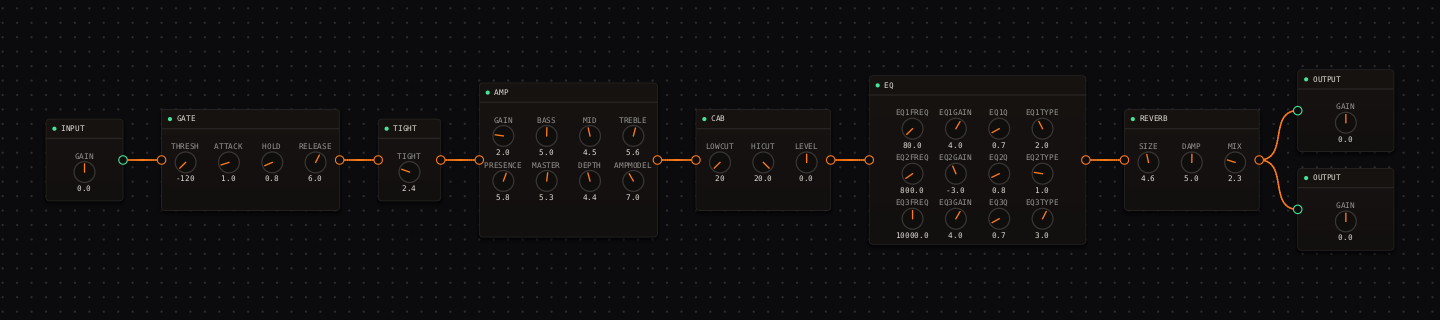
Reordering is wire surgery
The reason to learn this on a graph instead of a pedalboard is that trying an idea costs thirty seconds. Click a wire so it turns green, press Delete, and drag a new connection from port to port. Move one node, level-match with the global bypass button while watching the OUT meter, and decide. Order changes masquerade as loudness changes, so matched level is the only honest comparison.
Parallel lanes are the other half of the grammar
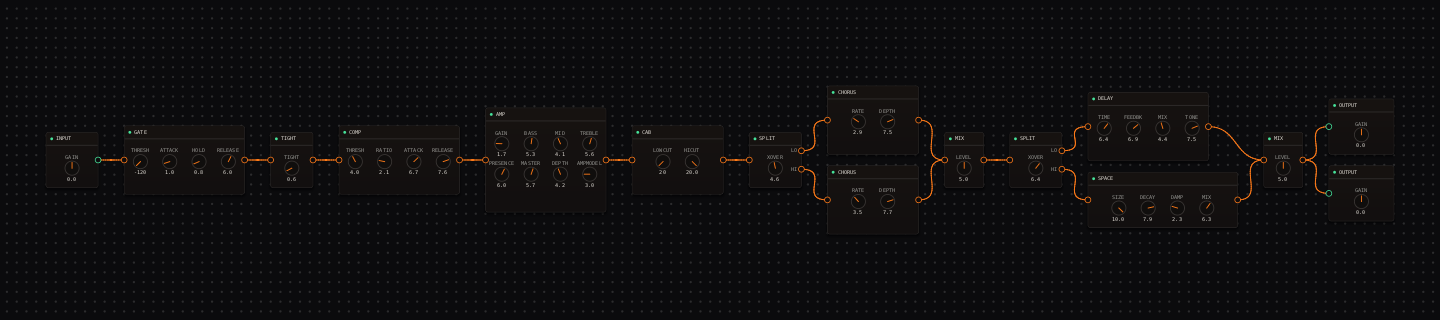
Serial order is only half the vocabulary. The published rigs use parallel lanes constantly, because effects in parallel hear the dry core and never each other. Wire one source into two effects, drop both onto the next stage's input, and the auto-inserted MIX node's LEVEL knob becomes your lane fader. It is the single most useful thing the graph offers that a pedalboard cannot.
Effects order: quick answers
- What is the correct order for guitar effects?
- The causal one: dynamics and filters (gate, tight, comp) first, then drive, then the amp and cab, then EQ, then time effects (delay, reverb) last. Each stage shapes what the next one receives, and time effects hear the finished tone so their tails do not get re-distorted.
- Why put reverb and delay at the end of the chain?
- So their tails carry a clean copy of the finished tone. Put them earlier and the amp re-distorts the echoes into mush. The one thing better than "last" is a parallel lane, where the wet effects never touch the dry core at all.
- How do I reorder effects in CrossWire?
- Click a wire so it turns green, press Delete, then drag a new connection from port to port. Two rules the engine enforces: dropping a wire on an input that is already fed auto-inserts a MIX node (that is how parallel lanes are born), and a connection that would form a loop is rejected.
Study it in a real rig
Open the Randomizer, paste a seed, click Recall. When a graph gets messy, View then Auto-Layout tidies it.
- Jazz tutorial: read a strict serial chain (the first screenshot).
- Country-blues tutorial: read a parallel fork wire by wire.
- Free-form seed f1581: crossover routing instead of one chain (the second screenshot).
Get the CrossWire demo → Standalone app and CLAP plugin, full fidelity, every seed recalls exactly.