Tone creation tutorial · Blues & roots
How to Create a Blues Guitar Tone in CrossWire
A responsive edge-of-breakup voice: a Tube-Screamer-style OVERDRIVE into the Marshall JCM800 2204 model, open-back 2x12 and a short room.
Quick answer
For a blues tone in CrossWire, recall this tutorial’s Rig Seed in the Randomizer (Options → Randomize, paste the seed and click Recall). It runs a gentle COMP and a screamer-style OVERDRIVE (DRIVE 5.1) into the Marshall - JCM800 2204 model at GAIN 5.3 — enough for sustained notes at full guitar volume that clean up when you back off — through the Fender - 2x12 Open Back cab and a short REVERB. There is no EQ node in this rig; the tone controls live on the amp.
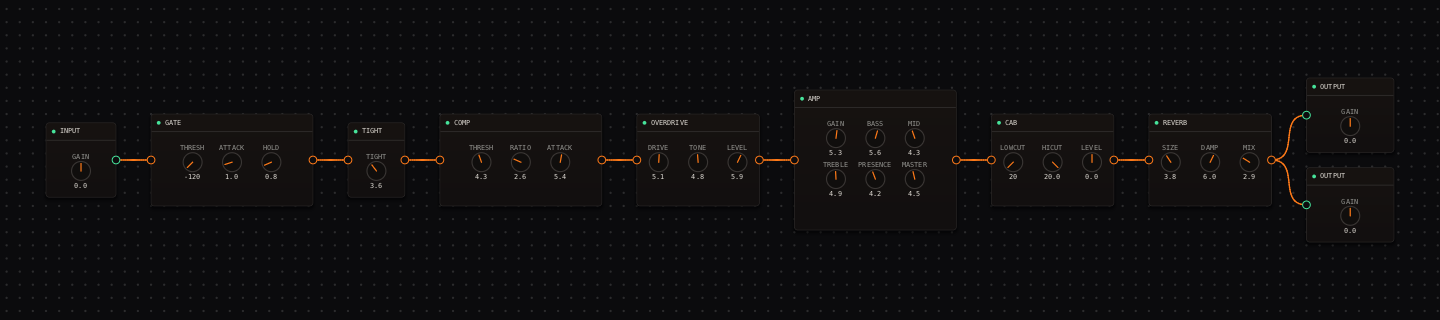
Blues Guitar signal chain at a glance
- 1INPUTset the input trim so hard strums stay unclipped on the IN meter
- 2GATEparked off — sustain and hum ring free in this rig
- 3TIGHTat 3.6, trims a little flub before the drive stages
- 4COMPgentle sustain and level control
- 5OVERDRIVEthe screamer-style push into the amp
- 6AMP — Marshall - JCM800 2204British crunch at GAIN 5.3 — the actual breakup source
- 7CAB — Fender - 2x12 Open Backlooser lows, airier top than a closed 4x12
- 8REVERBbrief room-like finish
- 9OUTPUTmatch the bypassed level with the OUTPUT GAIN knobs
Guitar setup: A neck or neck-and-middle pickup works well. Set the guitar volume around 7 for rhythm and open it for leads so the same CrossWire chain responds to your hands.
What this Rig Seed sets for you
Recall the seed and every node arrives set exactly as below — the rendered graph above shows the same values, so zoom in to cross-check any knob. Controls run 0–10 unless a unit is shown. To adjust: drag a knob up or down, hold Shift while dragging for fine steps, and note that double-clicking resets a knob to its factory default — not the seed’s value — so recall the seed again if you want the published baseline back.
| Stage | Recalled values | Why it is here |
|---|---|---|
| GATE / TIGHT | THRESH off · TIGHT 3.6 | Just enough low-end trim that chords don’t bloat when the OVERDRIVE hits the amp. |
| COMP | THRESH 4.3 · RATIO 2.6 · ATTACK 5.4 · RELEASE 6.1 | Adds sustain while preserving phrasing — the ratio is low enough that picking dynamics survive. |
| OVERDRIVE | DRIVE 5.1 · TONE 4.8 · LEVEL 5.9 | Close to the ts808 voicing in the node’s preset list: a firmer first note, not a new layer of fuzz. |
| AMP / CAB | GAIN 5.3 · BASS 5.6 · MID 4.3 · TREBLE 4.9 · PRESENCE 4.2 · MASTER 4.5 · DEPTH 4.9; CAB stock (LOWCUT 20 · HICUT 20.0) | The JCM800 2204 model frays at the edge on hard hits and cleans up from the guitar volume. |
| REVERB | SIZE 3.8 · DAMP 6.0 · MIX 2.9 | A short room that gives bends a place to sit without washing the groove. |
Listen for: Chords should have a grainy edge, while single notes sustain and clean up when you soften the pick attack.
Build this blues guitar tone in CrossWire
1. Recall this rig and find the edge with your volume knob
Recall this tutorial’s Rig Seed in the Randomizer (Options → Randomize, MODE "Randomize All"). Play a chord softly, then hard: at GAIN 5.3 the JCM800 2204 model frays only on the hard hit. Now roll the guitar volume to 7 and the same chain plays nearly clean — that contrast is the recipe.
2. Audition OVERDRIVE voicings from the dropdown
The OVERDRIVE node carries a voicing dropdown at the top of its body (it reads "(voicing)" until you use it — right-clicking the node body opens the same list). Try "ts808", then "klon-centaur": each rewrites DRIVE/TONE/LEVEL in one click. The recalled values (5.1 / 4.8 / 5.9) sit closest to the ts808 curve; pick whichever answers your pick attack best, then fine-tune with Shift-drag.
3. Level-match with the global bypass button
There is no per-node bypass in CrossWire — the "bypass" button in the top bar bypasses the whole rig. Toggle it while strumming and adjust the OUTPUT nodes’ GAIN knobs until bypassed and active feel equally loud. Louder almost always reads as "better", and this rig deserves an honest comparison.
How to adapt the recipe
- Need more bite? Drag OVERDRIVE TONE up from 4.8 a little before touching AMP TREBLE.
- Need less saturation? Drag OVERDRIVE LEVEL down from 5.9, or use the guitar volume, before reducing AMP MID.
Modeling note: The goal is a responsive edge-of-breakup voice, not a fixed amount of distortion. Pickup output and guitar-volume position are part of the signal chain here.
Troubleshooting the tone
- The tone will not clean up from the guitar volume
- drag OVERDRIVE DRIVE down from 5.1 first.
- Bends sound thin
- drag AMP MID up from 4.3, not BASS.
Try the chain in CrossWire
Download the complete standalone app or use the CLAP plugin in your DAW. Recall the seed, then move one node at a time to make the tone your own.
Get the free demo