Tone creation tutorial · Blues & roots
How to Create a Country Rock Tone in CrossWire
Clear, assertive twang on the Lab Series L5 clean platform, with a screamer OVERDRIVE for authority and a true slapback DELAY in a parallel lane.
Quick answer
For country rock in CrossWire, recall this tutorial’s Rig Seed. The amp is the Lab Series - L5 model at GAIN 2.2 — a solid-state clean platform with huge headroom — so all the forward edge comes from the OVERDRIVE in front of it (DRIVE 4.7, LEVEL 4.9). After the Fender - 2x12 Open Back cab, a slapback DELAY (TIME 2.1, FEEDBK 1.4) and a quiet room REVERB run in parallel lanes into MIX nodes. The result stays clear for chicken-picking with enough push for rock rhythm.
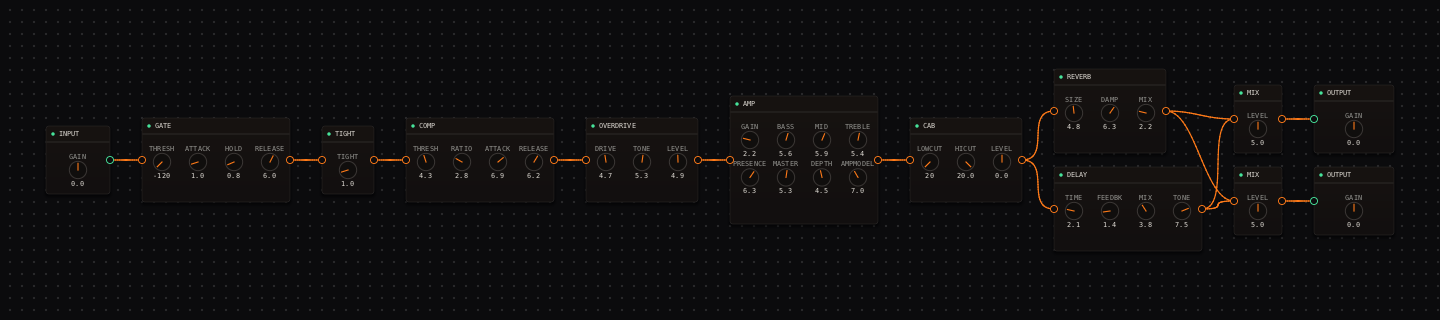
Country Rock signal chain at a glance
- 1INPUTclean headroom on the trim
- 2GATEparked off
- 3TIGHTa whisper at 1.0
- 4COMPcountry snap with a slow attack that keeps the pick tick
- 5OVERDRIVEthe entire drive character — the amp below stays clean
- 6AMP — Lab Series - L5solid-state headroom, scooped-clean voice
- 7CAB — Fender - 2x12 Open Backairy top, loose low end
- 8DELAYparallel lane one: a single quick slapback
- 9REVERBparallel lane two: barely-there room
- 10MIXthe lanes rejoin at the stereo MIX pair
- 11OUTPUTlevel-match against the bypassed rig
Guitar setup: A bridge pickup and firm picking bring out the twang. If your guitar is very bright, use the guitar tone control before cutting the amp’s TREBLE.
What this Rig Seed sets for you
Recall the seed and every node arrives set exactly as below — the rendered graph above shows the same values, so zoom in to cross-check any knob. Controls run 0–10 unless a unit is shown. To adjust: drag a knob up or down, hold Shift while dragging for fine steps, and note that double-clicking resets a knob to its factory default — not the seed’s value — so recall the seed again if you want the published baseline back.
| Stage | Recalled values | Why it is here |
|---|---|---|
| COMP / OVERDRIVE | COMP THRESH 4.3 · RATIO 2.8 · ATTACK 6.9 · RELEASE 6.2; OVERDRIVE DRIVE 4.7 · TONE 5.3 · LEVEL 4.9 | The compressor’s slow attack supplies the pop; the OVERDRIVE supplies the forward edge into a clean amp. |
| AMP / CAB | GAIN 2.2 · BASS 5.6 · MID 5.9 · TREBLE 5.4 · PRESENCE 6.3 · MASTER 5.3 · DEPTH 4.5; CAB stock | The L5 model never breaks up at this gain — attack stays bright without becoming brittle. |
| DELAY (lane one) | TIME 2.1 · FEEDBK 1.4 · MIX 3.8 · TONE 7.5 | One compact repeat. Compare with the "slapback" entry in the DELAY node’s voicing dropdown (1.5 / 0.5 / 3.5 / 7.0) — this rig sits a touch longer and warmer. |
| REVERB (lane two) / MIX | SIZE 4.8 · DAMP 6.3 · MIX 2.2; both MIX nodes at LEVEL 5.0 | The room is quieter than the slapback so fast lines never blur. |
Listen for: Fast picked notes should jump out evenly, with one compact repeat behind them and no low-end haze.
Build this country rock tone in CrossWire
1. Recall this rig and hear where the drive lives
Recall this tutorial’s Rig Seed. Drag OVERDRIVE LEVEL from 4.9 to 0 and back while picking: the amp underneath (Lab Series - L5, GAIN 2.2) is so clean that the whole personality of the rig rides on that one knob. That separation — clean platform, drive in front — is why this tone stays clear at speed.
2. Tune the slapback at song tempo
DELAY sits at TIME 2.1, FEEDBK 1.4, MIX 3.8. Open its voicing dropdown and try "slapback" (1.5 / 0.5 / 3.5 / 7.0) for the tighter classic double, then Shift-drag TIME between 1.5 and 2.5 while a two-bar lick loops until the repeat lands with the song. Keep FEEDBK under 2.0 — one repeat is the sound; two is an echo effect.
3. Dial the snap around your right hand
Play muted single notes and drag COMP ATTACK down from 6.9: somewhere around 3 the pick tick starts disappearing into clamp. Country picking wants the tick, so Shift-drag back up until it just returns. That threshold is different for every player’s hand, which is why the seed can’t choose it for you.
How to adapt the recipe
- For more drive, drag OVERDRIVE LEVEL up from 4.9 before touching DRIVE.
- For a more modern country edge, double-click an empty spot on an EQ node’s curve if you add one — or simply drag AMP PRESENCE above 6.3.
Modeling note: Country rock rewards a controlled transient and a clear dry center. The slapback is a supporting texture in its own parallel lane, so it stays quieter than the picked note by construction.
Troubleshooting the tone
- Too much squash
- drag COMP THRESH up from 4.3 so fewer notes are caught.
- Slapback blurs fast lines
- drag DELAY MIX down from 3.8 first, then FEEDBK from 1.4.
Try the chain in CrossWire
Download the complete standalone app or use the CLAP plugin in your DAW. Recall the seed, then move one node at a time to make the tone your own.
Get the free demo