Tone creation tutorial · Clean & acoustic-style
How to Create a Classical Guitar Tone in CrossWire
A warm, articulate clean chain — slow opto-style compression into the Fender Tweed Clean model, a Pultec-style EQ curve and a small damped room.
Quick answer
For a classical guitar-style tone in CrossWire, open Options → Randomize, paste in this tutorial’s Rig Seed (shown below) and click Recall. It sets a slow, gentle COMP (RATIO 2.4, ATTACK 6.7) into the Fender - Tweed Clean amp model at GAIN 2.3 and the Fender - Tweed 1x12 cab, warms the result with a Pultec-style EQ curve (+5 dB low shelf at 60 Hz) and adds a small damped REVERB at MIX 2.1. Play fingerstyle on a neck pickup for the most convincing result.
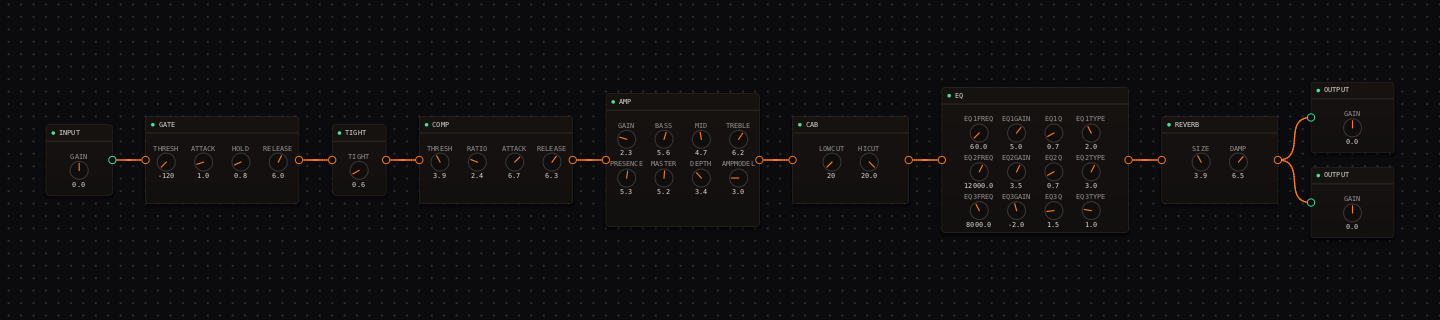
Classical Guitar signal chain at a glance
- 1INPUTits GAIN knob is the master input trim — keep the IN meter out of the red
- 2GATEparked off in this rig (THRESH below −90 dB reads "off")
- 3TIGHTbarely engaged at 0.6 — the low end passes untouched
- 4COMPslow opto-style levelling for even fingerstyle notes
- 5AMP — Fender - Tweed Cleantwo gentle stages, wide open, GAIN parked at 2.3
- 6CAB — Fender - Tweed 1x12compact tweed speaker, LOWCUT/HICUT wide open
- 7EQthe pultec-eqp1a curve: warm low shelf, airy high shelf, small 8 kHz dip
- 8REVERBsmall damped room at a low mix
- 9OUTPUTstereo pair — each carries its own GAIN trim
Guitar setup: Use a neck pickup, roll the guitar tone back slightly, and fingerpick close to the neck. This recipe shapes an electric guitar toward a warm nylon-like role; it does not replace the acoustic resonance of a real nylon-string instrument.
What this Rig Seed sets for you
Recall the seed and every node arrives set exactly as below — the rendered graph above shows the same values, so zoom in to cross-check any knob. Controls run 0–10 unless a unit is shown. To adjust: drag a knob up or down, hold Shift while dragging for fine steps, and note that double-clicking resets a knob to its factory default — not the seed’s value — so recall the seed again if you want the published baseline back.
| Stage | Recalled values | Why it is here |
|---|---|---|
| GATE / TIGHT | THRESH off (parked below −90 dB) · TIGHT 0.6 | Nothing chokes fingerstyle dynamics; the front end is effectively transparent. |
| COMP | THRESH 3.9 · RATIO 2.4 · ATTACK 6.7 · RELEASE 6.3 | Slow attack lets each fingertip transient through before the level evens out — opto-style, like the la-2a voicing in the COMP node’s preset list. |
| AMP / CAB | GAIN 2.3 · BASS 5.6 · MID 4.7 · TREBLE 6.2 · PRESENCE 5.3 · MASTER 5.2 · DEPTH 3.4; CAB LOWCUT 20 Hz · HICUT 20.0 kHz · LEVEL 0.0 | The Tweed Clean model stays fully clean at GAIN 2.3; the cab is left wide open so the EQ does the shaping. |
| EQ | low shelf 60 Hz +5.0 dB (Q 0.7) · high shelf 12 kHz +3.5 dB (Q 0.7) · bell 8 kHz −2.0 dB (Q 1.5) | The classic Pultec low-boost/high-dip trick: body and air without brittle nail attack. Hover a band handle to see this readout live. |
| REVERB | SIZE 3.9 · DAMP 6.5 · MIX 2.1 | A small, dark room behind the dry attack — not a wash. |
Listen for: Every note should bloom evenly, with clear separation in arpeggios and no sharp fizz on the attack.
Build this classical guitar tone in CrossWire
1. Recall the rig, knob by knob
Open Options → Randomize. In the RANDOMIZER window set MODE to "Randomize All", paste this tutorial’s Rig Seed into the seed box and click Recall. The readout beneath describes the collapsed rig and the canvas rebuilds itself — use View → Zoom Fit to frame it. Every value in the table above is now set for you.
2. Learn the knob gestures on the COMP
Drag a knob up to raise it, down to lower it; hold Shift while dragging for fine steps. Drag COMP ATTACK down from 6.7 toward 2.0 while fingerpicking and hear the fingertip transient get clamped — then Shift-drag it back. One warning: double-clicking a knob resets it to its factory default, not to this rig’s value, so if you lose a setting, just recall this rig’s seed again.
3. Read the EQ as a curve, not knobs
The EQ node draws its three active bands as colored handles on a response curve. Hover the leftmost handle and the readout beneath shows "1: low shelf 60 Hz +5.0 dB Q 0.70". Drag the 8 kHz handle down if fingernail click bothers you, and scroll the wheel over a handle to change its Q. The hint line under the curve lists every gesture.
How to adapt the recipe
- If the sound is too electric, drag AMP PRESENCE down from 5.3 before touching TREBLE.
- If arpeggios are uneven, drag COMP THRESH down a little (more notes caught) instead of adding amp gain.
Modeling note: This is an electric-guitar approximation of a warm, nylon-like role. A real nylon-string instrument remains the right source when its acoustic body resonance is central to the arrangement.
Troubleshooting the tone
- Boomy bass notes
- drag CAB LOWCUT up from 20 Hz toward 110 Hz.
- Harsh fingernail attack
- drag the EQ’s 8 kHz bell handle lower — watch the readout move from −2.0 dB toward −4.0 dB.
Try the chain in CrossWire
Download the complete standalone app or use the CLAP plugin in your DAW. Recall the seed, then move one node at a time to make the tone your own.
Get the free demo