Tone creation tutorial · Clean & acoustic-style
How to Create a Surf Guitar Tone in CrossWire
A dark tweed clean with a genuine hall — REVERB SIZE 7.4 at the end of the chain is the splash, and the amp stays out of its way.
Quick answer
For surf guitar in CrossWire, recall this tutorial’s Rig Seed. The core is deliberately dark and clean — the Fender - Tweed Clean model at GAIN 2.1 with TREBLE 4.0 and PRESENCE 3.0 into the Fender - 2x12 Open Back cab — so the identity comes from the hall-sized REVERB at the end of the chain: SIZE 7.4, DAMP 4.7, MIX 3.0. Every staccato note throws a splash behind it while the dry attack arrives first.
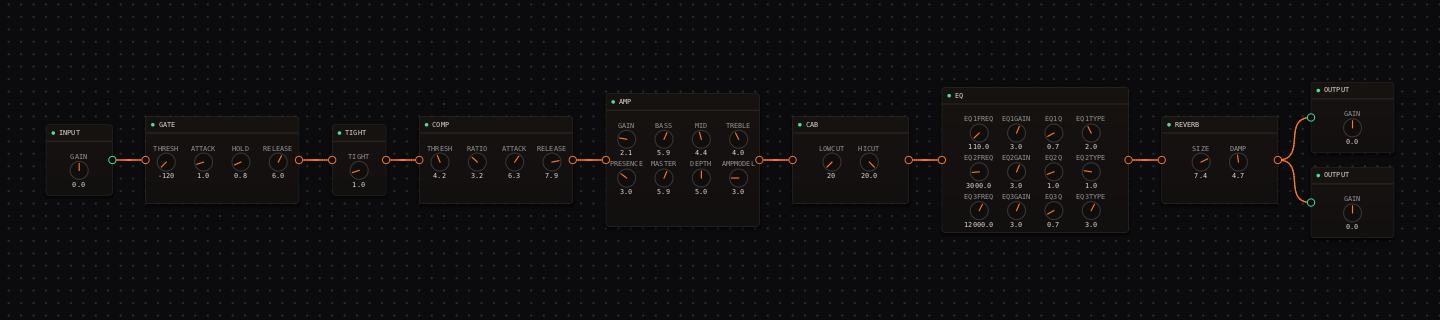
Surf Guitar signal chain at a glance
- 1INPUTbright, direct pickup signal
- 2GATEparked off
- 3TIGHTa whisper at 1.0
- 4COMPgentle transient control
- 5AMP — Fender - Tweed Cleankept dark on purpose: TREBLE 4.0, PRESENCE 3.0
- 6CAB — Fender - 2x12 Open Backopen and quick
- 7EQthe neve-1084 curve brings back controlled sparkle
- 8REVERBthe hall — this node IS the surf sound
- 9OUTPUTkeep the wet peaks controlled
Guitar setup: A bridge single coil and firm picking give the attack its snap. Use palm-muted low-string lines and let the reverb carry the space between notes.
What this Rig Seed sets for you
Recall the seed and every node arrives set exactly as below — the rendered graph above shows the same values, so zoom in to cross-check any knob. Controls run 0–10 unless a unit is shown. To adjust: drag a knob up or down, hold Shift while dragging for fine steps, and note that double-clicking resets a knob to its factory default — not the seed’s value — so recall the seed again if you want the published baseline back.
| Stage | Recalled values | Why it is here |
|---|---|---|
| COMP | THRESH 4.2 · RATIO 3.2 · ATTACK 6.3 · RELEASE 7.9 | Evens fast picked runs; the slow attack keeps the pick click that reads as "surf". |
| AMP / CAB | GAIN 2.1 · BASS 5.9 · MID 4.4 · TREBLE 4.0 · PRESENCE 3.0 · MASTER 5.9 · DEPTH 5.0; CAB stock | A dark clean platform — brightness added here would turn the hall’s splash harsh. |
| EQ | low shelf 110 Hz +3.0 dB · bell 3 kHz +3.0 dB · high shelf 12 kHz +3.0 dB | The 3 kHz bell is the pick attack; the shelves add weight and air without amp glare. |
| REVERB | SIZE 7.4 · DAMP 4.7 · MIX 3.0 | A genuine hall. Compare the "hall" entry in the REVERB node’s voicing dropdown (8.5 / 3.5 / 4.0) — this rig is slightly smaller and drier so fast lines stay intelligible. |
Listen for: Each picked note should have a clear attack followed by a bright splash; fast muted lines should remain intelligible under the tail.
Build this surf guitar tone in CrossWire
1. Recall this rig and meet the real splash
Recall this tutorial’s Rig Seed. The hall REVERB at the end of the chain — SIZE 7.4, MIX 3.0 — is the surf identity; the amp is deliberately dark (TREBLE 4.0, PRESENCE 3.0) so the splash never turns to glass. Play short staccato notes and listen for the attack landing first, splash trailing.
2. Set drip before space
Drag REVERB DAMP down from 4.7 toward 3.5 and the splash brightens into drip. Then, only if the room feels small, nudge SIZE. Raising MIX first is the classic mistake — it washes fast muted lines before the character improves. The "plate" entry in the reverb’s voicing dropdown (6.0 / 2.0 / 4.0) is a brighter alternative worth one A/B.
3. The spring-into-amp experiment
Vintage units put reverb before the amp so the amp reacts to the splash. To try it: click the COMP→AMP wire, Delete; click the EQ→REVERB wire, Delete; then drag COMP’s output onto REVERB’s input and REVERB’s output onto AMP’s input. Watch for the auto-Mix behavior — dropping onto an already-fed input inserts a Mix node, which you don’t want here. Compare at matched volume, keep whichever version you believe, and recall this rig’s seed again to reset.
How to adapt the recipe
- For more drip, drag REVERB DAMP down from 4.7 toward 3.5 (brighter splash) before touching SIZE.
- For the vintage spring-into-amp experiment, rewire REVERB ahead of the AMP: click each of its wires and press Delete, then drag COMP’s output to REVERB’s input and REVERB’s output to AMP’s input. Recall this rig’s seed again to undo everything.
Modeling note: The published rig uses the safer post-cab reverb placement; pre-amp reverb is presented as a deliberate, reversible experiment rather than the baseline.
Troubleshooting the tone
- The chain is too washy
- drag REVERB MIX down from 3.0 before touching the amp.
- Attack is harsh
- drag the EQ’s 3 kHz bell handle down a little — watch the readout fall from +3.0 dB.
Try the chain in CrossWire
Download the complete standalone app or use the CLAP plugin in your DAW. Recall the seed, then move one node at a time to make the tone your own.
Get the free demo