Tone creation tutorial · Clean & acoustic-style
How to Create a Jazz Guitar Tone in CrossWire
The simplest rig in the collection: the Lab Series L5 clean platform, an open-back 2x12, a smile EQ and a soft room — no compressor, no drive.
Quick answer
For jazz guitar in CrossWire, recall this tutorial’s Rig Seed — the shortest signal path in these tutorials: INPUT, GATE (off), a whisper of TIGHT, then the Lab Series - L5 model at GAIN 2.0 into the Fender - 2x12 Open Back cab, a smile EQ curve and a soft REVERB at MIX 2.3. There is no COMP node: wide chord voicings keep their natural dynamics, which is most of what makes a jazz clean sound expensive.
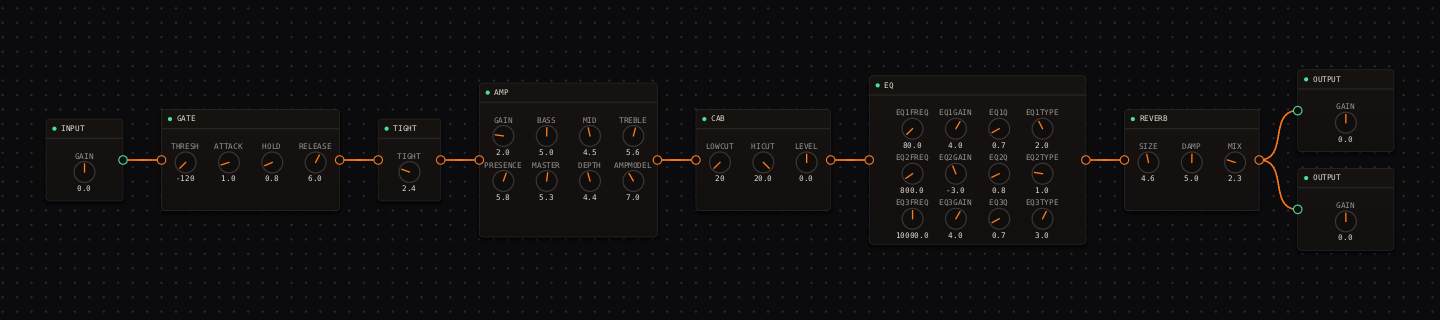
Jazz Guitar signal chain at a glance
- 1INPUTample headroom — wide voicings peak higher than single notes
- 2GATEparked off
- 3TIGHTa whisper at 2.4
- 4AMP — Lab Series - L5the archetypal solid-state jazz platform, GAIN 2.0
- 5CAB — Fender - 2x12 Open Backopen low end, soft mids
- 6EQthe smile curve, used gently
- 7REVERBsmall room, low mix
- 8OUTPUTkeep chord peaks intact
Guitar setup: Use a neck humbucker or neck single coil and roll the guitar tone back until the attack is rounded but the chord still has definition.
What this Rig Seed sets for you
Recall the seed and every node arrives set exactly as below — the rendered graph above shows the same values, so zoom in to cross-check any knob. Controls run 0–10 unless a unit is shown. To adjust: drag a knob up or down, hold Shift while dragging for fine steps, and note that double-clicking resets a knob to its factory default — not the seed’s value — so recall the seed again if you want the published baseline back.
| Stage | Recalled values | Why it is here |
|---|---|---|
| GATE / TIGHT | THRESH off · TIGHT 2.4 | Nothing moves until you do — no gate pumping under sustained chords. |
| AMP | GAIN 2.0 · BASS 5.0 · MID 4.5 · TREBLE 5.6 · PRESENCE 5.8 · MASTER 5.3 · DEPTH 4.4 | The L5 model’s scooped-clean voice with enormous headroom — the real amp was the house jazz combo for a reason. |
| CAB / EQ | CAB LOWCUT 20 Hz · HICUT 20.0 kHz · LEVEL 0.0; EQ low shelf 80 Hz +4.0 dB · bell 800 Hz −3.0 dB · high shelf 10 kHz +4.0 dB | Warmth below, air above, a touch less boxiness at 800 Hz. Drag CAB HICUT down toward 6.5 kHz for a darker archtop voice. |
| REVERB | SIZE 4.6 · DAMP 5.0 · MIX 2.3 | Depth without pretending the guitar is in a concert hall. |
Listen for: Chord extensions should be warm but separately audible; notes should decay naturally rather than being flattened.
Build this jazz guitar tone in CrossWire
1. Recall this rig and notice what isn’t there
Recall this tutorial’s Rig Seed — the shortest path in these tutorials. No COMP: play a wide voicing softly, then a strong four-note chord, and the dynamic difference survives intact. If quiet chord tones vanish in a mix later, that’s the moment to right-click empty canvas, choose "Comp" from the add-node toolbox, and wire it between TIGHT and AMP — not before.
2. Round the top at the cab, not the amp
The CAB’s HICUT sits wide open at 20.0 kHz. Drag it down toward 6.5 and the tone moves from modern-clean to archtop-dark while AMP TREBLE stays untouched for later fine-tuning. This one knob covers most of the range between "jazz gig" and "jazz record from 1959".
3. Browse the cabinet catalog properly
Open the CAB node’s model dropdown, type into its "Search for..." box, and hover any entry for a moment: an info panel appears with the make, model and a tone blurb. Try "Celestion - Blue/Greenback 1x12" for a warmer, more vocal midrange than the recalled Fender 2x12 — the knobs keep their values across model swaps, so comparisons stay honest.
How to adapt the recipe
- For more body, drag the EQ’s 80 Hz shelf up slightly before touching AMP BASS.
- For clarity in a dense mix, drag AMP TREBLE up from 5.6 rather than PRESENCE — the L5’s presence band gets glassy fast.
Modeling note: The chain prioritises uncompressed chord detail and a rounded attack. The low reverb mix adds depth without pretending the guitar is in a large hall.
Troubleshooting the tone
- The sound is muddy
- drag CAB LOWCUT up from 20 Hz toward 80 Hz.
- The sound is too dull
- drag the 800 Hz bell handle up toward −1.0 dB before adding reverb.
Try the chain in CrossWire
Download the complete standalone app or use the CLAP plugin in your DAW. Recall the seed, then move one node at a time to make the tone your own.
Get the free demo