Tone creation tutorial · Clean & acoustic-style
How to Create a Funk Guitar Tone in CrossWire
A completely dry rhythm machine: the Lab Series L5 at GAIN 1.2, a smile EQ, and a COMP whose slow attack is what keeps the sixteenth-note tick.
Quick answer
For funk guitar in CrossWire, recall this tutorial’s Rig Seed. It is completely dry — no DELAY, no REVERB node in the rig — just a COMP (RATIO 3.0, ATTACK 5.9) into the Lab Series - L5 model at GAIN 1.2 with a darker top (TREBLE 3.3), the Fender - 2x12 Open Back cab and the smile EQ curve. The space in a funk part comes from the groove and the rests, and this rig refuses to fill them.
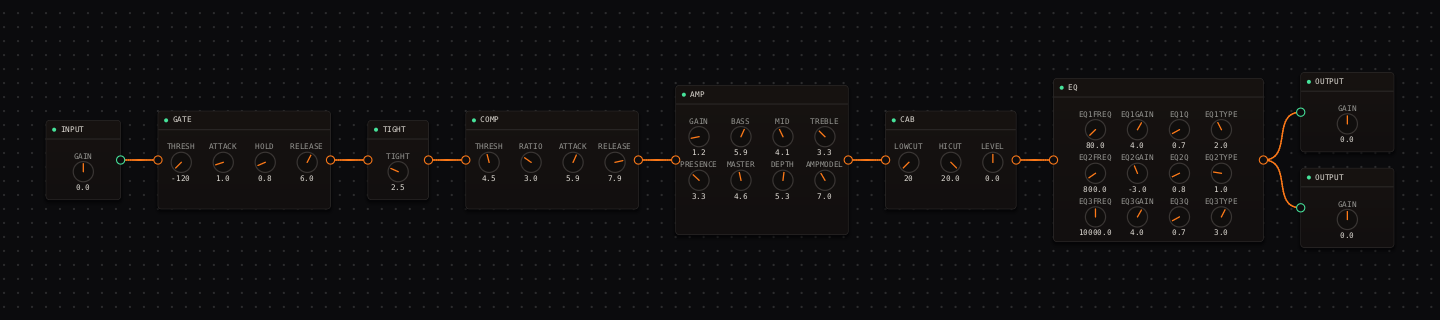
Funk Guitar signal chain at a glance
- 1INPUTclean pick and muted-string detail
- 2GATEparked off — ghost notes are the point, never gate them
- 3TIGHTlight at 2.5
- 4COMPthe funk engine: slow-attack levelling that keeps the tick
- 5AMP — Lab Series - L5GAIN 1.2 — the cleanest amp setting in these tutorials
- 6CAB — Fender - 2x12 Open Backopen, quick response
- 7EQthe smile curve carves the rhythm pocket
- 8OUTPUTbalanced against the band — nothing follows the EQ
Guitar setup: Use a bridge-and-middle or bridge single-coil setting. Lightly mute unused strings and work on consistent sixteenth-note accents before changing the chain.
What this Rig Seed sets for you
Recall the seed and every node arrives set exactly as below — the rendered graph above shows the same values, so zoom in to cross-check any knob. Controls run 0–10 unless a unit is shown. To adjust: drag a knob up or down, hold Shift while dragging for fine steps, and note that double-clicking resets a knob to its factory default — not the seed’s value — so recall the seed again if you want the published baseline back.
| Stage | Recalled values | Why it is here |
|---|---|---|
| GATE / TIGHT | THRESH off · TIGHT 2.5 | Muted scratches must pass untouched — an engaged gate would eat the groove. |
| COMP | THRESH 4.5 · RATIO 3.0 · ATTACK 5.9 · RELEASE 7.9 | The slow ATTACK is deliberate: the pick’s tick escapes before compression clamps, so ghost notes stay audible while chords even out. |
| AMP / CAB | GAIN 1.2 · BASS 5.9 · MID 4.1 · TREBLE 3.3 · PRESENCE 3.3 · MASTER 4.6 · DEPTH 5.3; CAB stock | Dark and utterly clean — the EQ’s 10 kHz shelf supplies the crispness in a controlled band instead. |
| EQ | low shelf 80 Hz +4.0 dB · bell 800 Hz −3.0 dB (Q 0.8) · high shelf 10 kHz +4.0 dB | The 800 Hz dip removes boxiness so muted sixteenths read as rhythm, not clutter. |
Listen for: Muted sixteenth notes should have a clear tick and chords should stop quickly, with no low-frequency spill into the rests.
Build this funk guitar tone in CrossWire
1. Recall this rig and practice the silence
Recall this tutorial’s Rig Seed and play muted sixteenths between short chord stabs. The rig is completely dry — no delay, no reverb — so every rest you play actually happens. If the part feels empty, that’s the groove’s job to fix, not a wet knob’s.
2. Find your hand in the COMP attack
Drag COMP ATTACK down from 5.9 in small moves while playing the same two-bar figure. Around 3 the ghost-note tick starts vanishing into clamp; Shift-drag back up until it just reappears. That edge is personal — set it for the player, not for the solo’d sound. RELEASE 7.9 is long on purpose: it stops the compressor pumping against sixteenth-note rhythms.
3. A/B honestly with the bypass button
Use the top-bar "bypass" button (the only bypass in CrossWire — it bypasses the whole rig) and watch the OUT meter while you toggle: match levels with the OUTPUT nodes’ GAIN knobs so the comparison is fair. A funk chain should win on feel at equal loudness, not on volume.
How to adapt the recipe
- For more clamp-and-pop, drag COMP ATTACK down from 5.9 toward 2.0 and listen to the tick disappear into squash — then Shift-drag it back until the tick just returns.
- For a rounder vintage funk voice, drag the EQ’s 10 kHz shelf down before touching AMP TREBLE.
Modeling note: The clean, compact chain is a deliberate constraint. Funk guitar earns its place through transient detail and muted rhythm, not a wide effects field.
Troubleshooting the tone
- The part feels flat
- drag COMP RATIO down from 3.0, not the reverb you don’t have — dryness is the sound.
- The low strings clutter the groove
- drag CAB LOWCUT up from 20 Hz toward 100 Hz.
Try the chain in CrossWire
Download the complete standalone app or use the CLAP plugin in your DAW. Recall the seed, then move one node at a time to make the tone your own.
Get the free demo