How to use chorus with guitar
Chorus is the effect of restraint. Done right it makes one guitar sound like a wider, richer version of itself; pushed too far it sounds like two guitars slightly out of tune. The entire craft is knowing where that line is, and when to cross it on purpose.
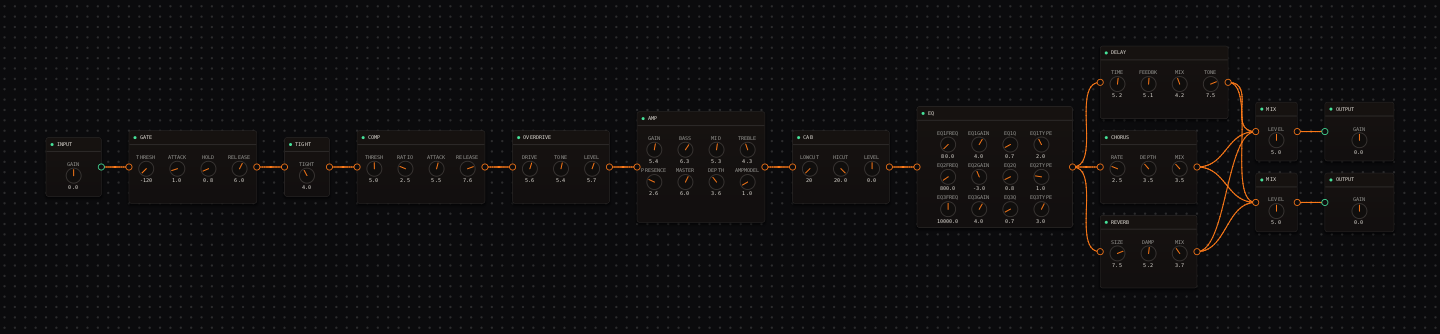
CrossWire field notes. Both routings below are real, recallable rigs: a chorus in a parallel lane, and the band-split trick that runs two choruses at once without either fighting the other.
Every other modulation effect announces itself. Chorus, at its best, does not. It just makes the guitar feel bigger, and you would only notice it was there if you switched it off. That is because chorus works by mixing your signal with a copy that is delayed and constantly, gently detuned. A little of that reads as width and shimmer. Too much of it reads as an obvious wobble, and past that, as a second badly-tuned instrument.
Find the wobble threshold first
Before you pick a setting, find the edge. The three knobs are RATE, DEPTH and MIX (0–10, defaulting to 3.0 / 5.0 / 5.0), and DEPTH is the one that decides how far the pitch travels.
Hold a sustained chord and raise DEPTH slowly. At some point you will hear the pitch actually move, a distinct wobble rather than a shimmer. Back off one small step (hold Shift while dragging for fine control). That point, just below audible wobble, is the widest this part can be while still sounding like a single guitar. Every good "invisible" chorus setting lives just under that line.
The knob that flips it into an instrument
MIX is usually the quiet one. It just balances wet against dry. But chorus has a trick the other modulations don’t: turn MIX all the way to 10 and there is no dry signal left, so the pitch modulation is the entire sound. Now it becomes vibrato: an expressive, played effect rather than width. The "vibrato" and "hammond-vibrato" voicings below are exactly this, and they belong on single-note melodies, not chords.
Eight voicings, polite to unhinged
These are the exact entries on the CHORUS node’s voicing dropdown, a spectrum from "is it on?" to full vibrato. Recall one and adjust from there. Values are RATE · DEPTH · MIX.
| Voicing | Values | What it is |
|---|---|---|
| ce2 | 2.5 · 4.0 · 4.0 | The pedal classic: slow, warm, present but polite. |
| dimension-d | 1.5 · 3.0 · 3.0 | Barely-moving studio width; the "is it even on?" setting. |
| lush-80s | 3.5 · 7.0 · 6.0 | Deep and unapologetic; sits well on clean arpeggios. |
| crosswire | 3.0 · 5.0 · 5.0 | The house general-purpose stereo chorus (the knob defaults). |
| ceb3-bass | 2.5 · 4.5 · 4.5 | Voiced to keep low-string body intact. |
| solina | 4.0 · 6.0 · 6.5 | String-ensemble shimmer for pad-like parts. |
| vibrato | 8.5 · 5.0 · 10.0 | Full-wet: pure pitch modulation, no dry signal left. |
| hammond-vibrato | 6.5 · 4.0 · 10.0 | The shallower scanner-vibrato cousin. |
The CrossWire move: split the band, chorus each half
Here is a trick a pedalboard can’t do. Two choruses running at once normally phase against each other into a mess. But if you first split the guitar into a low band and a high band, and give each band its own chorus at a slightly different rate, neither chorus ever sees the other’s frequencies, so they can’t phase. The result moves constantly and never sounds seasick.
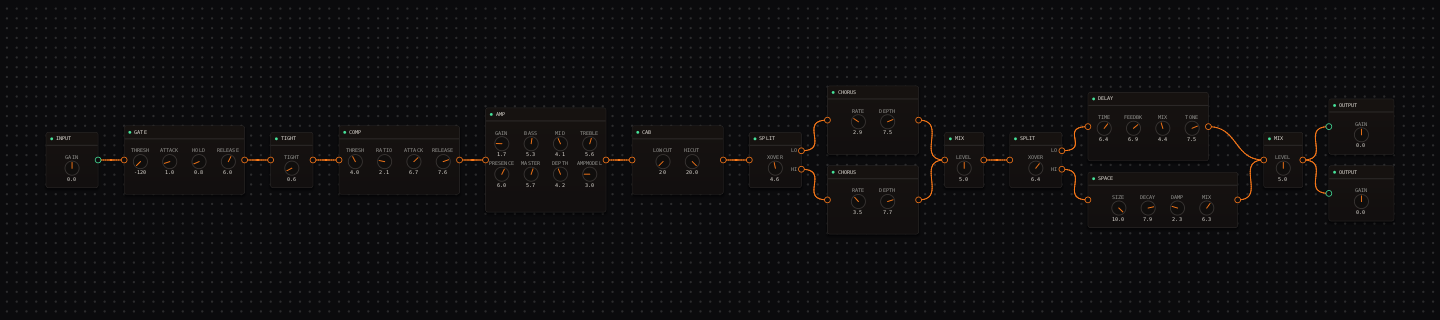
To build it in CrossWire: right-click the canvas, add a Split, wire its LO and HI ports into two CHORUS nodes at slightly different rates, then rejoin them into a MIX node. It is the single most distinctive thing you can do with the CHORUS node, and it takes about thirty seconds.
Three ways chorus goes wrong
Too much depth. The line between "wide" and "seasick" is a small move on the DEPTH knob, so find the threshold and stay under it. Chorus on heavy distortion. Thick, saturated tones and pitch-smearing modulation fight; keep it subtle there, or use a parallel lane you can fade. Chasing the tempo. Chorus rate is a feel rather than a rhythmic value. Matching it to the song’s BPM does nothing useful; match it to how busy the part is instead.
Chorus on guitar: quick answers
- How do you stop chorus from sounding seasick?
- Back off DEPTH. Seasickness is the pitch moving far enough to hear as detuning. Raise DEPTH slowly on a sustained chord until you just catch the pitch wobble, then drag it down one step. That is the widest the part can be while still reading as one guitar rather than two out-of-tune ones.
- What is the best chorus setting for clean guitar?
- Slow and shallow. A rate around 2.5 and moderate depth (the ce2 or dimension-d voicings) widens clean arpeggios without announcing itself. Save deep, fast settings for a specific effect rather than a default clean sound.
- Can chorus be used as a vibrato?
- Yes. That is what the wet mix at maximum does. At MIX 10 there is no dry signal left, so the pitch modulation is the whole sound: true vibrato rather than widening. The "vibrato" and "hammond-vibrato" voicings are exactly this, and they work best on single-note melodies rather than chords.
- Where should chorus go in the signal chain?
- After the amp and cab, conventionally, so the modulation reads against a finished tone. On heavily distorted sounds chorus muddies fast, so many players run it in a parallel lane whose level can be faded to zero. That gives you width you can dial in and out without touching the rest of the tone.
Hear these in a real rig
Open the Randomizer, paste a seed, click Recall, and the canvas rebuilds with every value set.
- Indie: chorus as one of three parallel ambience lanes (the first screenshot).
- Ambient: the deep, generated-space end of the chorus family.
- Free-form seed f1581: the band-split dual chorus, with "Free-form graphs" ticked.
- Rig Market: community rigs that use CHORUS.
Get the CrossWire demo → Standalone app and CLAP plugin, full fidelity, every seed recalls exactly.