Tone creation tutorial · Texture & ambience
How to Create a Indie Guitar Tone in CrossWire
A driven JCM800 core with three ambience lanes — CHORUS, DELAY and a big REVERB — running in parallel off the EQ, so the dry note never drowns.
Quick answer
For an indie guitar tone in CrossWire, recall this tutorial’s Rig Seed. A screamer OVERDRIVE feeds the Marshall - JCM800 2204 model at GAIN 5.4 (PRESENCE pulled down to 2.6 for a soft top) into the Fender - 2x12 Open Back cab and a smile EQ. Then the graph forks three ways: CHORUS, DELAY and a SIZE-7.5 REVERB each take their own parallel lane into the MIX nodes. Because the lanes never stack in series, the dry chord stays identifiable under all three textures.
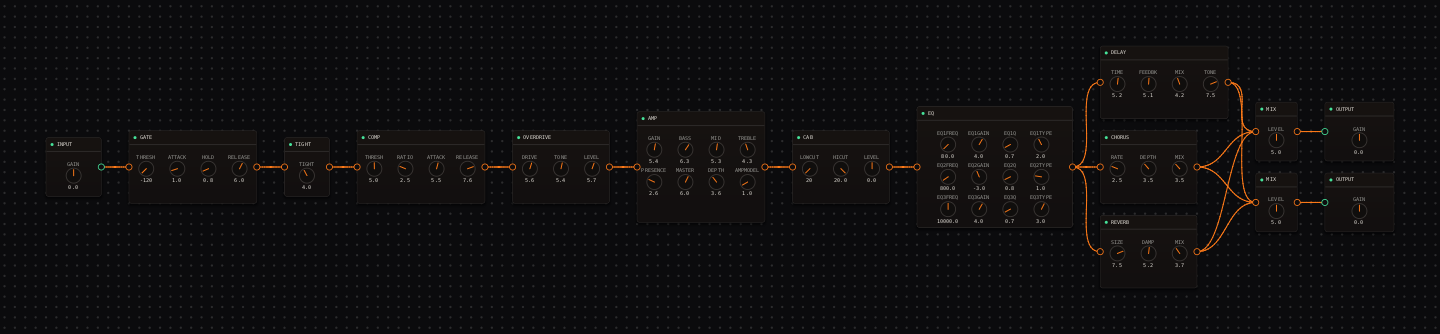
Indie Guitar signal chain at a glance
- 1INPUTretain pick dynamics
- 2GATEparked off
- 3TIGHTat 4.0 under the drive
- 4COMPgentle glue
- 5OVERDRIVEsubtle edge of breakup
- 6AMP — Marshall - JCM800 2204warm crunch, PRESENCE deliberately low at 2.6
- 7CAB — Fender - 2x12 Open Backspacious cabinet voice
- 8EQthe smile curve — and the fork point for all three lanes
- 9CHORUSlane one: slow width
- 10DELAYlane two: mid-length repeats
- 11REVERBlane three: a large room
- 12MIXall three lanes rejoin at the stereo MIX pair
- 13OUTPUTlevel-match wet and dry
Guitar setup: Single coils emphasise chime; humbuckers make the same settings thicker. Get to know the dry core first — drag each lane’s MIX knob to 0 and back while a chord rings.
What this Rig Seed sets for you
Recall the seed and every node arrives set exactly as below — the rendered graph above shows the same values, so zoom in to cross-check any knob. Controls run 0–10 unless a unit is shown. To adjust: drag a knob up or down, hold Shift while dragging for fine steps, and note that double-clicking resets a knob to its factory default — not the seed’s value — so recall the seed again if you want the published baseline back.
| Stage | Recalled values | Why it is here |
|---|---|---|
| OVERDRIVE / AMP | DRIVE 5.6 · TONE 5.4 · LEVEL 5.7; AMP GAIN 5.4 · BASS 6.3 · MID 5.3 · TREBLE 4.3 · PRESENCE 2.6 · MASTER 6.0 · DEPTH 3.6 | A driven but soft-topped core — the low PRESENCE is what lets three wet lanes sit on it without harshness. |
| CHORUS (lane one) | RATE 2.5 · DEPTH 3.5 · MIX 3.5 | Width without an obvious pitch wobble — near the ce2 voicing in the node’s preset list. |
| DELAY (lane two) | TIME 5.2 · FEEDBK 5.1 · MIX 4.2 · TONE 7.5 | Repeats that sit behind the part; drag TONE down toward 4.0 for darker, tape-style trails. |
| REVERB (lane three) / MIX | SIZE 7.5 · DAMP 5.2 · MIX 3.7; both MIX nodes LEVEL 5.0 | The big room lives in its own lane, so raising it never doubles through the delay. |
Listen for: The dry guitar remains obvious in the middle, while width and repeats become apparent around sustained chords.
Build this indie guitar tone in CrossWire
1. Recall this rig and solo each lane by ear
Recall this tutorial’s Rig Seed. Three lanes leave the EQ: CHORUS, DELAY, REVERB, all rejoining at the MIX pair. Drag one lane’s MIX knob to 0 (CHORUS MIX 3.5 → 0), listen, restore it, and repeat for the others. Two minutes of this teaches you the rig better than any description — and because the lanes are parallel, muting one never changes the others.
2. Give each section its own lane recipe
Verse: CHORUS MIX 0, DELAY MIX 4.2, REVERB as recalled. Chorus: CHORUS back to 3.5. Bridge: drag DELAY TONE from 7.5 down to 4.0 for tape-dark repeats. Save each as its own preset via File → Save... ("indie-verse", "indie-big") and switch from the top-bar preset dropdown between takes.
3. Keep the core honest under the texture
With all three lanes up, the driven JCM800 core should still be obvious in the middle. If it recedes, drag the newest lane down first — do not compensate with AMP GAIN, which thickens the input to all three lanes at once and turns width into blur.
How to adapt the recipe
- For a verse, drag CHORUS MIX from 3.5 to 0 — the lane falls silent but the graph stays intact for the chorus.
- For more urgency, drag OVERDRIVE LEVEL up from 5.7 before adding any lane’s MIX.
Modeling note: The texture is three parallel lanes around one driven core, so each effect can serve an arrangement change independently — the graph is the arrangement tool.
Troubleshooting the tone
- The sound is seasick
- drag CHORUS DEPTH down from 3.5, then its MIX.
- The part blurs
- drag DELAY FEEDBK down from 5.1 before touching REVERB SIZE.
Try the chain in CrossWire
Download the complete standalone app or use the CLAP plugin in your DAW. Recall the seed, then move one node at a time to make the tone your own.
Get the free demo