Tone creation tutorial · Texture & ambience
How to Create a Ambient Guitar Tone in CrossWire
Three parallel lanes off one quiet core: CHORUS, a long DELAY and SPACE — CrossWire’s generative room node — each reach the dry signal independently and rejoin at a MIX.
Quick answer
For ambient guitar in CrossWire, open Options → Randomize, paste in this tutorial’s Rig Seed and click Recall. A quiet Fender - Tweed Clean core (GAIN 1.7) feeds three parallel lanes at once — CHORUS, a long DELAY and SPACE, CrossWire’s generative room node, here at SIZE 10.0 with room shape SEED 88 — which all rejoin at one MIX before the outputs. No lane hears any other lane, so muting one never changes the rest.
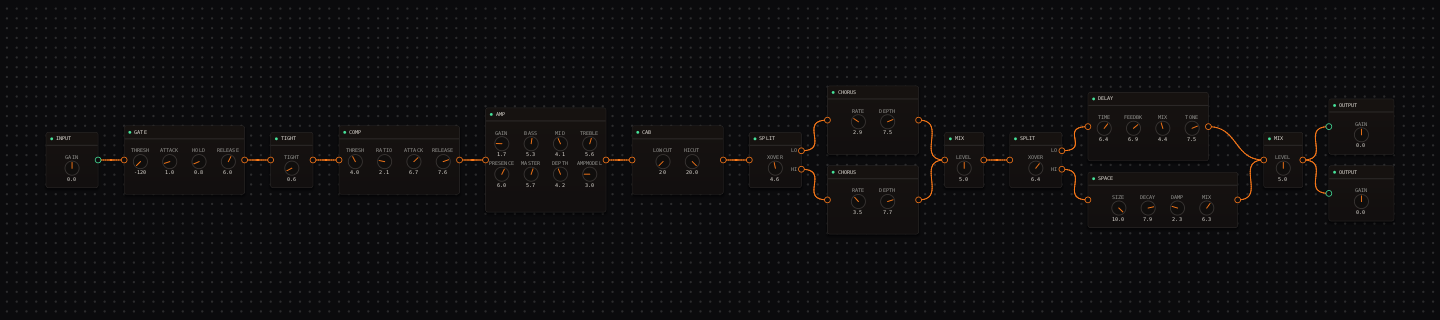
Ambient Guitar signal chain at a glance
- 1INPUTset a clean, dynamic source
- 2GATEparked off — tails must never be cut
- 3TIGHTa whisper at 0.6
- 4COMPslow, gentle levelling
- 5AMP — Fender - Tweed CleanGAIN 1.7: a neutral pad-friendly core
- 6CAB — Fender - 2x12 Open Backopen, quick foundation
- 7CHORUSone parallel lane off the cab: shimmer
- 8DELAYa second parallel lane: long dark repeats
- 9SPACEa third parallel lane: a generated room, SEED 88 of 99
- 10MIXall three lanes rejoin
- 11OUTPUTlevel-match the whole field
Guitar setup: Use the neck pickup for a pad-like voice, and play fewer notes than you think you need. Swells from the guitar volume control keep working while the wet field decays.
What this Rig Seed sets for you
Recall the seed and every node arrives set exactly as below — the rendered graph above shows the same values, so zoom in to cross-check any knob. Controls run 0–10 unless a unit is shown. To adjust: drag a knob up or down, hold Shift while dragging for fine steps, and note that double-clicking resets a knob to its factory default — not the seed’s value — so recall the seed again if you want the published baseline back.
| Stage | Recalled values | Why it is here |
|---|---|---|
| Core | COMP THRESH 4.0 · RATIO 2.1 · ATTACK 6.7 · RELEASE 7.6; AMP GAIN 1.7 · BASS 5.3 · MID 4.1 · TREBLE 5.6 · PRESENCE 6.0 · MASTER 5.7 · DEPTH 4.2 | Everything before the fork stays clean and even — the interest comes from the parallel routing, not the core. |
| CHORUS lane | RATE 2.9 · DEPTH 7.5 · MIX 6.1 | A deep, slow shimmer running the whole time, never fighting the other two lanes for space. |
| DELAY lane | TIME 6.4 · FEEDBK 6.9 · MIX 4.4 · TONE 7.5 (trimmed to 0.8 at the MIX node) | Long dark repeats, sitting slightly under the other two lanes so it thickens rather than dominates. |
| SPACE lane | SIZE 10.0 · DECAY 7.9 · DAMP 2.3 · MIX 6.3 · SEED 88 | SPACE generates a room from its SEED knob (0–99) — 88 is this rig’s hall. Drag SEED and each value is a different generated space; drag it back to 88 to return. |
Listen for: A picked note should appear immediately, then separate into three independent textures — shimmer, repeats and the generated room — none of them fighting for the same space.
Build this ambient guitar tone in CrossWire
1. Recall this rig and hear three lanes at once
Open Options → Randomize, paste this tutorial’s Rig Seed and click Recall. Follow the CAB’s output: it feeds CHORUS, DELAY and SPACE independently, and all three rejoin at one MIX node before the outputs. Click any of the three wires leaving the CAB to see it highlight — that fork is the whole graph.
2. Solo each lane by ear
Drag the DELAY lane’s wire-into-MIX gain down toward 0 (or the CHORUS/SPACE lane’s), listen, then restore it and repeat for the others. Because the lanes are parallel, muting one never changes what the other two are doing — that independence is the whole lesson.
3. Meet SPACE, the generated room
SPACE is not the REVERB node: it synthesises a room from its SEED knob. This rig uses SEED 88 with SIZE 10.0, DECAY 7.9 and very low damping (2.3). Drag SEED — each of its 100 values (0–99) is a genuinely different generated space, some metallic, some soft. When one fits the piece, note the number the same way you’d note a rig seed; drag back to 88 to return to the published sound.
How to adapt the recipe
- For a different room without touching anything else, drag SPACE SEED — every integer from 0 to 99 is a distinct generated space.
- To rebalance the field, drag each lane’s wire-into-MIX gain (or the lane’s own MIX knob) — because the lanes are parallel, changing one never changes the others.
Modeling note: Three independent parallel lanes — chorus, delay, and the generative SPACE node — off one quiet core. Each lane hears only the dry signal, never the others, so they layer without smearing into each other.
Troubleshooting the tone
- The tail overwhelms new notes
- drag DELAY FEEDBK down from 6.9, then SPACE MIX from 6.3.
- The field feels static
- nudge CHORUS RATE away from 2.9 — a slightly different rate keeps the texture moving.
Try the chain in CrossWire
Download the complete standalone app or use the CLAP plugin in your DAW. Recall the seed, then move one node at a time to make the tone your own.
Get the free demo