Tone creation tutorial · Texture & ambience
How to Create a Shoegaze Guitar Tone in CrossWire
A fuzz-into-plexi wall with a gate holding it on a leash, and CHORUS, DELAY and a SIZE-9.1 wash REVERB layered as parallel lanes off the cab.
Quick answer
For shoegaze in CrossWire, recall this tutorial’s Rig Seed. A big-muff-style DIST (DRIVE 7.7, dark TONE 3.5) drives the Marshall - 1959 Super Lead model into the Jensen - 2x12 Open Back cab, with the GATE engaged at −43 dB to hold feedback and hiss between phrases. Off the cab, three parallel lanes build the wall: CHORUS, a long DELAY (FEEDBK 6.9) and a wash REVERB at SIZE 9.1 with MIX 5.3. Because the lanes are parallel, the fuzz core stays identifiable inside the bloom.
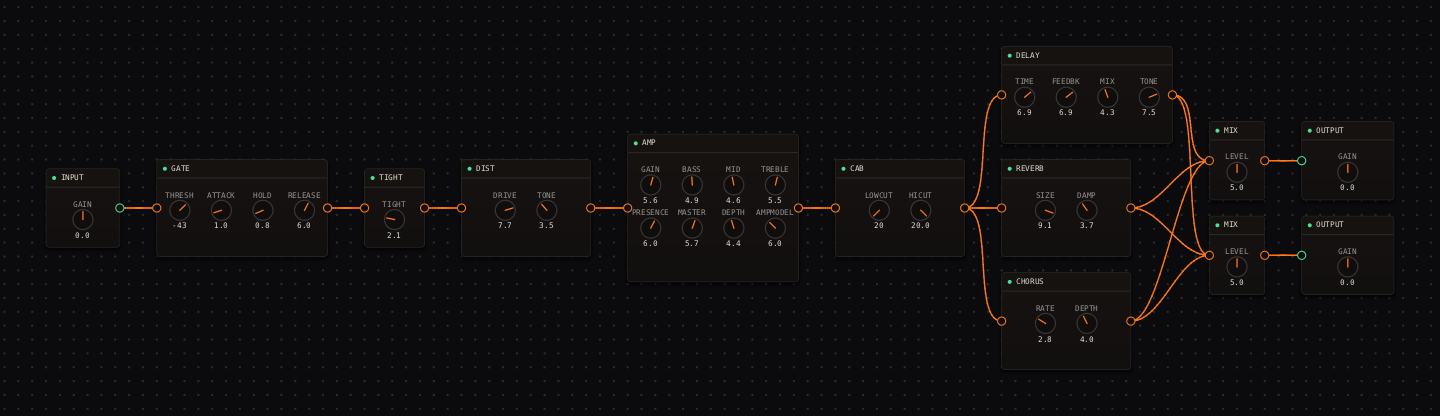
Shoegaze Guitar signal chain at a glance
- 1INPUTclean source into the fuzz
- 2GATEengaged at −43 dB — the leash on the wall
- 3TIGHTlight at 2.1
- 4DISTbig-muff-style sustain, dark tone — there is no compressor; the fuzz is the compressor
- 5AMP — Marshall - 1959 Super Leadplexi chime behind the fuzz
- 6CAB — Jensen - 2x12 Open Backair and upper-mid detail
- 7CHORUSlane one: slow motion inside the wall
- 8DELAYlane two: long, regenerating repeats
- 9REVERBlane three: the wash
- 10MIXthe wall reassembles at the stereo MIX pair
- 11OUTPUTleave room for accumulated tails
Guitar setup: Use a bridge pickup for cut or a neck pickup for a thicker wash. Loop a simple two-chord figure and make one knob change at a time — this rig hides sloppy moves.
What this Rig Seed sets for you
Recall the seed and every node arrives set exactly as below — the rendered graph above shows the same values, so zoom in to cross-check any knob. Controls run 0–10 unless a unit is shown. To adjust: drag a knob up or down, hold Shift while dragging for fine steps, and note that double-clicking resets a knob to its factory default — not the seed’s value — so recall the seed again if you want the published baseline back.
| Stage | Recalled values | Why it is here |
|---|---|---|
| GATE / TIGHT / DIST | THRESH −43 dB · TIGHT 2.1; DIST DRIVE 7.7 · TONE 3.5 · LEVEL 4.9 | DRIVE 7.7 with a dark tone sits near the big-muff voicing in the DIST node’s preset list; the gate stops it howling in the rests. |
| AMP / CAB | GAIN 5.6 · BASS 4.9 · MID 4.6 · TREBLE 5.5 · PRESENCE 6.0 · MASTER 5.7 · DEPTH 4.4; CAB stock | The plexi model adds openness the fuzz took away — a wall with detail instead of a smear. |
| CHORUS / DELAY | CHORUS RATE 2.8 · DEPTH 4.0 · MIX 3.3; DELAY TIME 6.9 · FEEDBK 6.9 · MIX 4.3 · TONE 7.5 | The delay regenerates for bars; it lives in its own lane so it never re-enters the reverb. |
| REVERB / MIX | SIZE 9.1 · DAMP 3.7 · MIX 5.3; both MIX nodes LEVEL 5.0 | SIZE 9.1 with low damping is the bloom. MIX 5.3 keeps half the lane dry, which is why the riff survives. |
Listen for: Sustained chords should widen and bloom while a simple riff remains audible through the texture.
Build this shoegaze guitar tone in CrossWire
1. Recall this rig and check the wall has a spine
Recall this tutorial’s Rig Seed, hold a chord, and confirm you can still name the notes: the fuzz core (DIST 7.7 into the plexi model) should read through the bloom because the wet lanes are parallel, not stacked. If it already sounds like weather, your input is too hot — check the IN meter and the INPUT node’s GAIN first.
2. Raise the wall one lane at a time
Drag all three lane mixes down (CHORUS MIX 3.3, DELAY MIX 4.3, REVERB MIX 5.3 → all toward 0), loop a two-note figure, then bring them back one at a time in that order. You’ll hear exactly when the DELAY’s FEEDBK 6.9 begins hiding new notes — that’s the ceiling; everything below it is usable wall.
3. Use the gate as a performance tool
The GATE at −43 dB decides where phrases end. Drag THRESH up toward −35 and stops become abrupt, almost rhythmic; drag it below −90 (readout: "off") and feedback and hiss join the piece between phrases. Both are legitimate shoegaze — the knob is choosing which record you’re making.
How to adapt the recipe
- For more wall, drag REVERB MIX up from 5.3 toward 7.0 before adding DIST DRIVE — the fuzz is already near its ceiling.
- If feedback between phrases becomes part of the music, drag GATE THRESH down from −43 until it stops interrupting (below −90 it reads "off").
Modeling note: The wall is parallel by construction: chorus, delay and wash reverb each see the dry fuzz core, never each other. That is why the riff survives inside it.
Troubleshooting the tone
- The bass turns to mush
- drag CAB LOWCUT up from 20 Hz toward 120 Hz.
- New notes vanish
- drag DELAY FEEDBK down from 6.9 first — it is the lane that accumulates.
Try the chain in CrossWire
Download the complete standalone app or use the CLAP plugin in your DAW. Recall the seed, then move one node at a time to make the tone your own.
Get the free demo