How to use EQ with guitar
The EQ node is not a row of knobs. It is a response curve you draw with the mouse, with a readout that tells you the exact numbers. Learn the gestures and it becomes the most precise tool in the rig.
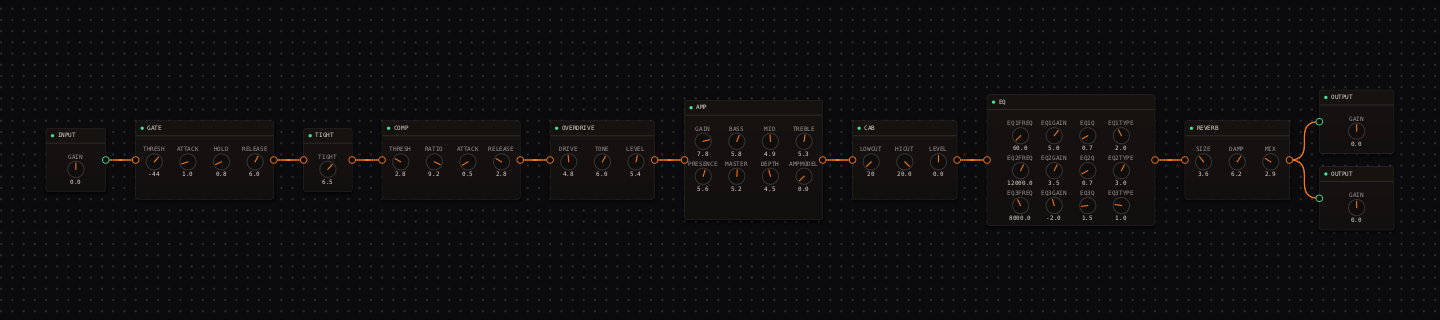
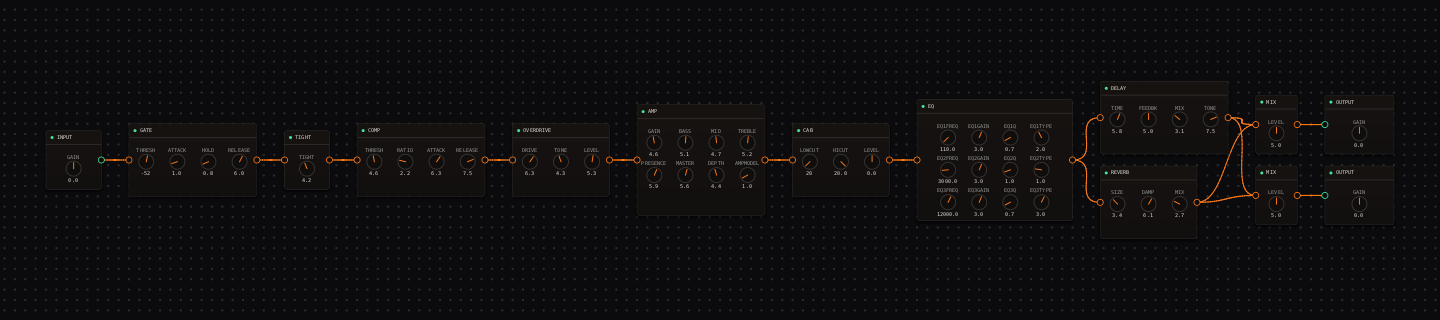
CrossWire field notes. Both rigs pictured are real and recallable, each running a different classic hardware curve after the cab.
Most EQ interfaces hide the truth behind sliders. The CrossWire EQ node shows it: an interactive curve you shape directly, with up to six bands, each drawn in its own color under the bold summed line. The move that makes it click is realizing you are editing a graph, so every gesture is direct.
How you edit the curve
- Double-click empty curve space to add a bell band at that exact frequency and gain.
- Drag a band's handle to move it; scroll the wheel over a handle to change its Q.
- Right-click a handle for the shape menu: bell, low shelf, high shelf, high pass, low pass, or remove.
- Double-click a handle to delete it.
Hover any band and the line under the curve prints its real numbers, for example "1: low shelf 60 Hz +5.0 dB Q 0.70". The curve flatters; the numbers do not. Before you keep a move, say the readout out loud. "Bell, 3 kHz, +6 dB, Q 4" usually talks you down to +3.
Seven hardware curves to start from
The EQ node's voicing dropdown carries classic hardware curves as full band layouts. Recall one and edit from there, because the presets encode decades of "this shape works on guitar". Each is quoted as the readout shows it.
| Curve | Bands | What it is |
|---|---|---|
| pultec-eqp1a | 60 Hz +5.0 low shelf · 12 kHz +3.5 high shelf · 8 kHz -2.0 bell | The low-boost/high-dip warmth trick. The metal and classical rigs ship it. |
| api-550a | 100 Hz +3.0 bell · 3 kHz +4.0 bell · 12 kHz +2.5 bell | Punchy proportional bells, the forward American curve. |
| neve-1084 | 110 Hz +3.0 low shelf · 3 kHz +3.0 bell · 12 kHz +3.0 high shelf | Body, cut and air in one move. The rock and surf rigs use it. |
| smile | 80 Hz +4.0 low shelf · 800 Hz -3.0 bell · 10 kHz +4.0 high shelf | The smile curve. The 800 Hz dip is a hole shaped for a bass player. |
| tc-pre | 120 Hz +3.0 low shelf · 8 kHz +4.0 high shelf | Two-band brightener for dull cleans. |
| neumann-w495b | 40 Hz +2.5 low shelf · 1.5 kHz +2.0 bell · 8 kHz +3.0 high shelf | The broadcast-gentle version of more of everything. |
| lpf-hpf | high pass 90 Hz · low pass 9 kHz | Pure bracketing. The fastest fix for boom and fizz at once. |
EQ on guitar: quick answers
- How is the CrossWire EQ different from the amp tone knobs?
- The amp's BASS/MID/TREBLE/PRESENCE shape the distortion character, because they sit inside the amp model. The EQ node shapes the finished result after the cab, the way a console channel would. They are different jobs, so use both.
- Should I cut or boost with EQ?
- Cut the problem before boosting the favorite. Sweep a narrow bell into the mud around 200 to 400 Hz and pull it down while the part plays. A 2 dB cut in the right place beats a 4 dB boost in a nice-sounding one.
- What is the fastest way to fix a boomy or fizzy tone?
- Recall the lpf-hpf voicing: a high pass at 90 Hz and a low pass at 9 kHz. It brackets the tone, removing sub-boom and top-end fizz in one move, and it is the quickest cleanup the node offers.
Hear these in a real rig
Open the Randomizer, paste a seed, click Recall.
- Metal tutorial: the Pultec curve after a V30 cab (the first screenshot).
- Rock tutorial: the Neve curve in a band (the second screenshot).
- Rig Market: community rigs that use EQ.
Get the CrossWire demo → Standalone app and CLAP plugin, full fidelity, every seed recalls exactly.