Tone creation tutorial · Driven & classic
How to Create a Rock Tone in CrossWire
A flexible British crunch: hot screamer into the Marshall JCM800 2204 model and V30 4x12, with a quarter-note DELAY and room in parallel lanes.
Quick answer
For a dependable rock tone in CrossWire, recall this tutorial’s Rig Seed. A hot screamer-style OVERDRIVE (DRIVE 6.3) feeds the Marshall - JCM800 2204 model at a moderate GAIN 4.6 into the Celestion - V30 4x12 Closed cab and a Neve-style EQ curve. A quarter-note DELAY and a short room REVERB run as parallel lanes into MIX nodes, so ambience sits behind the chords instead of on top of them. The GATE is set light at −52 dB.
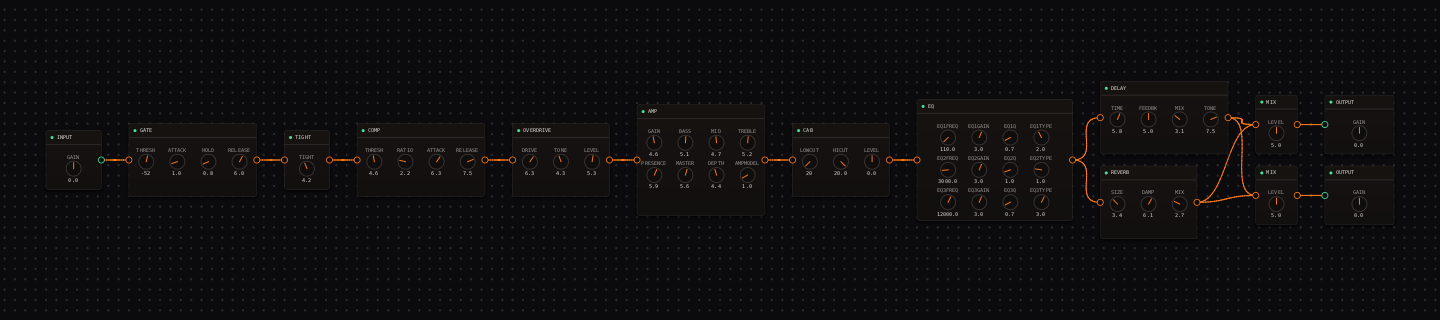
Rock signal chain at a glance
- 1INPUTclean, levelled source
- 2GATElight control at −52 dB
- 3TIGHTat 4.2, keeps the crunch focused
- 4COMPgentle glue ahead of the drive
- 5OVERDRIVEhot screamer push — more drive here than at the amp
- 6AMP — Marshall - JCM800 2204the classic barking rhythm channel at GAIN 4.6
- 7CAB — Celestion - V30 4x12 Closedrock-ready projection
- 8EQthe neve-1084 curve: +3 dB shelves at 110 Hz and 12 kHz, +3 dB bell at 3 kHz
- 9DELAYparallel lane one: quarter-note repeats for leads
- 10REVERBparallel lane two: short room
- 11MIXlanes rejoin at the stereo MIX pair
- 12OUTPUTmatch the bypassed level
Guitar setup: A bridge humbucker gives a dense rhythm sound; a bridge single coil gives more bite. Match output level before deciding which pickup works better.
What this Rig Seed sets for you
Recall the seed and every node arrives set exactly as below — the rendered graph above shows the same values, so zoom in to cross-check any knob. Controls run 0–10 unless a unit is shown. To adjust: drag a knob up or down, hold Shift while dragging for fine steps, and note that double-clicking resets a knob to its factory default — not the seed’s value — so recall the seed again if you want the published baseline back.
| Stage | Recalled values | Why it is here |
|---|---|---|
| GATE / TIGHT / COMP | THRESH −52 dB · TIGHT 4.2; COMP THRESH 4.6 · RATIO 2.2 · ATTACK 6.3 · RELEASE 7.5 | Controlled without sounding processed — the gate only catches idle noise. |
| OVERDRIVE / AMP | DRIVE 6.3 · TONE 4.3 · LEVEL 5.3; AMP GAIN 4.6 · BASS 5.1 · MID 4.7 · TREBLE 5.2 · PRESENCE 5.9 · MASTER 5.6 · DEPTH 4.4 | The drive pedal is hotter than the amp — that combination keeps the 800’s bark while the pedal supplies sustain. |
| EQ | low shelf 110 Hz +3.0 dB · bell 3 kHz +3.0 dB · high shelf 12 kHz +3.0 dB | The neve-1084 preset curve: body, cut and air in one move. Hover any handle to read it. |
| DELAY / REVERB / MIX | DELAY TIME 5.8 · FEEDBK 5.0 · MIX 3.1 · TONE 7.5; REVERB SIZE 3.4 · DAMP 6.1 · MIX 2.7; MIX LEVEL 5.0 × 2 | The ambience lanes should disappear when the band enters — drag either MIX node’s LEVEL to taste. |
Listen for: Power chords should have a defined center, and a bent note should carry without any extra drive stage.
Build this rock tone in CrossWire
1. Recall this rig and find the chord’s center
Recall this tutorial’s Rig Seed and strum a full power chord, then a small triad. Drag AMP MID around 4.7 with Shift for fine steps until both shapes keep a focused center. A great rock sound is usually the clearer one in this comparison, not the louder one.
2. Explore variants without losing the core
This is the rig to learn the Randomizer’s selective modes on. Click the AMP node, then Ctrl-click the CAB (both headers highlight), set MODE to "Pin Selected" and press "RANDOMIZE (KEEP PINNED)": CrossWire re-rolls everything around your amp-and-cab core. Prefer the reverse? MODE "Randomize Selected" re-rolls only what you selected. The seed readout updates each roll, so any variant you like can be recalled again by pasting its seed — or shared to the Rig Market.
3. Give leads their own space
The DELAY lane (TIME 5.8, quarter-note territory) is meant for leads: drag its MIX up from 3.1 for a solo section and back down for rhythm. Because it runs parallel to the REVERB lane and rejoins at the MIX nodes, pushing it never thickens the room — the two ambiences stay separate all the way to the outputs.
How to adapt the recipe
- For a drier rhythm sound, click the EQ→DELAY wire (it turns green) and press Delete — re-drag from the EQ’s output port to the DELAY’s input to restore it.
- For a lead lift, drag DELAY MIX up from 3.1 and switch to the neck pickup.
Modeling note: This is a flexible British-crunch baseline. Preserve its midrange identity first, then use pickup choice, guitar volume and the parallel delay lane to make arrangement changes.
Troubleshooting the tone
- The tone is buried
- drag AMP MID up from 4.7, not GAIN.
- The top is sharp
- drag AMP PRESENCE down from 5.9 before touching TREBLE.
Try the chain in CrossWire
Download the complete standalone app or use the CLAP plugin in your DAW. Recall the seed, then move one node at a time to make the tone your own.
Get the free demo