Tone creation tutorial · High gain
How to Create a Heavy Metal Tone in CrossWire
A tight, articulate high-gain rhythm chain: engaged GATE, heavy TIGHT filtering and a limiter-style COMP feeding the flagship Bogner Uberschall model.
Quick answer
For a heavy metal rhythm tone in CrossWire, recall this tutorial’s Rig Seed. It is the only tutorial rig with the GATE actually engaged (THRESH −44 dB) and it builds the chug in the front end: TIGHT at 6.5, a limiter-style COMP (RATIO 9.2, ATTACK 0.5) and a screamer OVERDRIVE feeding the Bogner - Uberschall model — CrossWire’s flagship high-gain voicing — at GAIN 7.8 into the Celestion - V30 4x12 Closed cab, finished with a Pultec-style EQ curve and an almost-dry room.
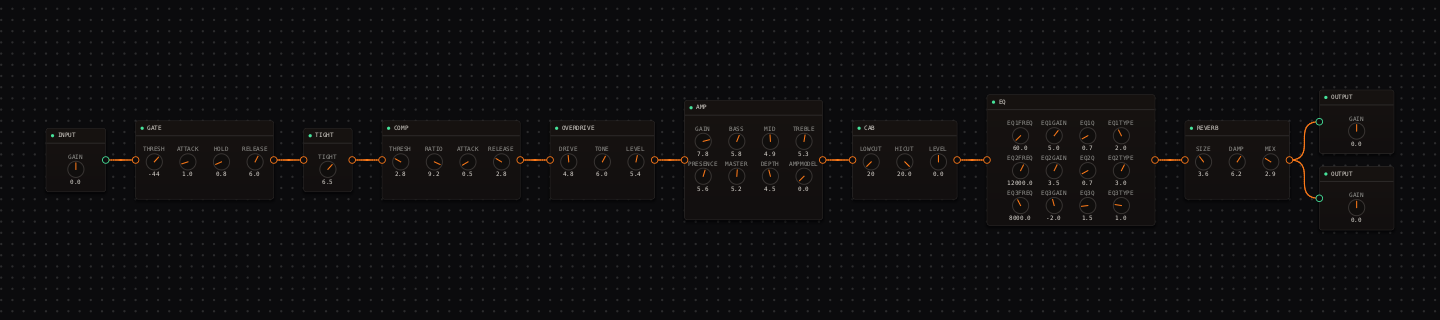
Heavy Metal signal chain at a glance
- 1INPUTkeep the IN meter out of the red — clipping before the GATE defeats it
- 2GATEengaged at −44 dB: silence between stops
- 3TIGHTat 6.5 — hard low-end trim before any gain stage
- 4COMPlimiter-style squash that hardens every palm-mute to the same attack
- 5OVERDRIVElow-mid drive, high level: the classic boost-into-high-gain move
- 6AMP — Bogner - Uberschallthe flagship model: four cascaded stages, saturated lows, aggressive upper mids
- 7CAB — Celestion - V30 4x12 Closedtight lows, present upper-mid bite
- 8EQthe pultec-eqp1a curve — warmth and air, not a scoop
- 9REVERBnearly dry room
- 10OUTPUTleave mix-bus headroom
Guitar setup: Use a bridge humbucker and mute unwanted strings aggressively. This starting point assumes standard or lower tuning; drag CAB LOWCUT upward if a down-tuned guitar gets loose.
What this Rig Seed sets for you
Recall the seed and every node arrives set exactly as below — the rendered graph above shows the same values, so zoom in to cross-check any knob. Controls run 0–10 unless a unit is shown. To adjust: drag a knob up or down, hold Shift while dragging for fine steps, and note that double-clicking resets a knob to its factory default — not the seed’s value — so recall the seed again if you want the published baseline back.
| Stage | Recalled values | Why it is here |
|---|---|---|
| GATE / TIGHT | THRESH −44 dB · ATTACK 1.0 · HOLD 0.8 · RELEASE 6.0; TIGHT 6.5 | The gate closes idle hiss between chugs; TIGHT stops the low E blooming before it ever reaches the drive. |
| COMP / OVERDRIVE | COMP THRESH 2.8 · RATIO 9.2 · ATTACK 0.5 · RELEASE 2.8; OVERDRIVE DRIVE 4.8 · TONE 6.0 · LEVEL 5.4 | RATIO 9.2 with a 0.5 attack is a limiter (compare the "squash" voicing in the COMP’s preset list) — every palm mute hits the amp identically. |
| AMP / CAB | GAIN 7.8 · BASS 5.8 · MID 4.9 · TREBLE 5.3 · PRESENCE 5.6 · MASTER 5.2 · DEPTH 4.5; CAB stock | The Uberschall model at 7.8 is saturated but readable because the front end already controlled the low end. |
| EQ / REVERB | low shelf 60 Hz +5.0 dB · high shelf 12 kHz +3.5 dB · bell 8 kHz −2.0 dB; REVERB SIZE 3.6 · DAMP 6.2 · MIX 2.9 | Weight and air added after the cab — deliberately not a mid scoop, so the guitar keeps its place in a mix. |
Listen for: Palm mutes should start immediately and stop cleanly; open chords should retain midrange shape instead of becoming a white-noise wash.
Build this heavy metal tone in CrossWire
1. Set the GATE with your hands off the strings
After recalling this tutorial’s Rig Seed, mute the strings and listen. THRESH sits at −44 dB; drag it down and the readout walks toward −90 (below that it reads "off"), drag it up and idle hiss dies earlier. Then hold a chord and check the tail: if the gate clips it, drag RELEASE up from 6.0. Do this before touching any gain knob — a gate set against the wrong noise floor poisons every later judgment.
2. Prove the chug comes from the front end
Palm-mute a low chug and drag TIGHT down from 6.5 to 2.0: the thump blooms and the attack goes soft, with the amp untouched. Back to 6.5, then drag COMP RATIO from 9.2 down to 3.0: the machine-gun consistency relaxes. This front end — TIGHT plus the limiter-style COMP plus OVERDRIVE LEVEL 5.4 — is the chug; the Uberschall model at GAIN 7.8 just amplifies the decision.
3. Judge the EQ against drums, not silence
Loop a riff against a kick-and-snare reference. If the guitar masks the kick, hover the EQ’s 60 Hz handle (readout: "1: low shelf 60 Hz +5.0 dB Q 0.70") and drag it down toward +2 dB. If the guitar vanishes, drag the 8 kHz bell up from −2.0 instead of adding amp TREBLE. Keep AMP GAIN still while you make mix decisions — moving two things at once hides which one worked.
How to adapt the recipe
- For less fizz, drag CAB HICUT down from 20.0 toward 7.0 kHz before touching AMP TREBLE.
- For more pick attack, drag OVERDRIVE LEVEL up from 5.4 — the amp is already deep in saturation, so attack comes from in front of it.
Modeling note: The amp gain is high but not maximal, and the EQ is deliberately not a mid scoop. The gate, TIGHT node, limiter-style compressor and cabinet do the stop-start work that makes a metal rhythm part feel finished.
Troubleshooting the tone
- The gate cuts sustained notes
- drag GATE THRESH down from −44 toward −55, or RELEASE up from 6.0.
- The tone is flubby
- drag CAB LOWCUT up from 20 Hz toward 90 Hz before reducing AMP BASS.
Try the chain in CrossWire
Download the complete standalone app or use the CLAP plugin in your DAW. Recall the seed, then move one node at a time to make the tone your own.
Get the free demo