Tone creation tutorial · High gain
How to Create a Punk Tone in CrossWire
A bone-dry, mid-forward wall: RAT-style DIST into the JCM800 2204 model cranked to GAIN 8.3, a smile-curve EQ — and no reverb node at all.
Quick answer
For punk guitar in CrossWire, recall this tutorial’s Rig Seed. A RAT-style DIST (DRIVE 5.6) drives the Marshall - JCM800 2204 model cranked to GAIN 8.3 with TREBLE 7.8 and PRESENCE 8.3, into the Celestion - V30 4x12 Closed cab and the smile EQ curve (+4 dB shelves at 80 Hz and 10 kHz, −3 dB bell at 800 Hz). There is deliberately no REVERB or DELAY node anywhere in this rig — the tightness you hear is the rig staying out of its own way.
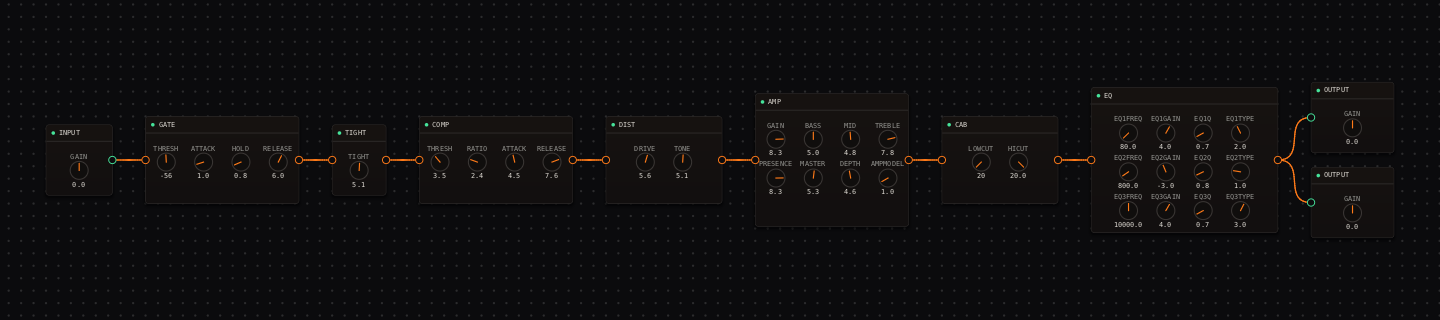
Punk signal chain at a glance
- 1INPUTdirect and uncompressed-sounding
- 2GATEengaged at −56 dB for quiet rests between parts
- 3TIGHTfirm at 5.1 — downstroke chugs stay compact
- 4COMPlight glue, slow enough to keep the attack
- 5DISTRAT-style pedal distortion in front of a cranked amp
- 6AMP — Marshall - JCM800 2204cranked: GAIN 8.3, bright and mean
- 7CAB — Celestion - V30 4x12 Closedfocused projection
- 8EQthe smile curve — but the 800 Hz dip is what makes room for the bass player
- 9OUTPUTset a practical band level — there is nothing after the EQ
Guitar setup: Use the bridge pickup and play hard. The tightness comes from consistent downstrokes and a bone-dry chain, not from any ambience.
What this Rig Seed sets for you
Recall the seed and every node arrives set exactly as below — the rendered graph above shows the same values, so zoom in to cross-check any knob. Controls run 0–10 unless a unit is shown. To adjust: drag a knob up or down, hold Shift while dragging for fine steps, and note that double-clicking resets a knob to its factory default — not the seed’s value — so recall the seed again if you want the published baseline back.
| Stage | Recalled values | Why it is here |
|---|---|---|
| GATE / TIGHT / COMP | THRESH −56 dB · TIGHT 5.1; COMP THRESH 3.5 · RATIO 2.4 · ATTACK 4.5 · RELEASE 7.6 | Stops ring-out between stabs without turning the guitar into a gated effect. |
| DIST | DRIVE 5.6 · TONE 5.1 · LEVEL 5.8 | Sits right on the "rat" voicing in the DIST node’s preset list — grind, not fuzz. |
| AMP / CAB | GAIN 8.3 · BASS 5.0 · MID 4.8 · TREBLE 7.8 · PRESENCE 8.3 · MASTER 5.3 · DEPTH 4.6; CAB stock | This is the same JCM800 2204 model as the rock and blues rigs — at 8.3 it stops being crunch and becomes a wall. |
| EQ | low shelf 80 Hz +4.0 dB · bell 800 Hz −3.0 dB (Q 0.8) · high shelf 10 kHz +4.0 dB | The −3 dB at 800 Hz is a hole for the bass guitar; the shelves keep the extremes aggressive. |
Listen for: Fast power chords should be percussive and centered, with a clear stop at the end of each phrase — and silence, not tail, between them.
Build this punk tone in CrossWire
1. Recall this rig and respect the dryness
Recall this tutorial’s Rig Seed and play a verse of continuous downstrokes. Notice what is missing: no DELAY, no REVERB — nothing after the EQ but the OUTPUT nodes. The urgency you hear is the JCM800 2204 model at GAIN 8.3 with nothing blurring the stops. Resist adding ambience until you’ve heard the part against drums.
2. Work the smile EQ like a mixer
The EQ’s 800 Hz bell at −3.0 dB is a hole shaped for a bass guitar. With a band playing, drag that handle deeper (watch the readout walk toward −5 dB) and the guitar gets leaner alone but sits harder in the arrangement. Scroll the wheel over the handle to widen the Q, and if you want a different shape entirely, right-click the handle for the band-type menu (bell, shelves, cuts) plus "remove band".
3. Save the variant before you lose it
Any knob you touch flips the top-bar preset name to "(edited)". When the band version works, File → Save..., type a name like punk-mid-hole and confirm — it joins File → Load for the next rehearsal. The Recall box always brings back the published baseline, so saving costs you nothing.
How to adapt the recipe
- For a rawer sound, drag DIST DRIVE down from 5.6 and AMP GAIN stays at 8.3 — the amp carries it.
- For more 1990s weight, drag the EQ’s 80 Hz shelf handle up a little — watch the readout, stop by +6 dB.
Modeling note: Punk rhythm is an arrangement sound: dry, quick and mid-forward. The recipe leaves room for bass and drums while retaining an aggressive pick attack.
Troubleshooting the tone
- The rhythm track sounds small
- drag the 800 Hz bell handle back up toward −1.5 dB before touching BASS.
- The top end splatters
- drag DIST TONE down from 5.1, or CAB HICUT down from 20.0 toward 8.0 kHz.
Try the chain in CrossWire
Download the complete standalone app or use the CLAP plugin in your DAW. Recall the seed, then move one node at a time to make the tone your own.
Get the free demo