How to use a noise gate with guitar
The gate is the one CrossWire effect with a real-unit knob, and the one most players leave on when they should turn it off. Here is when it earns its place, and how to set it so it never eats your sustain.
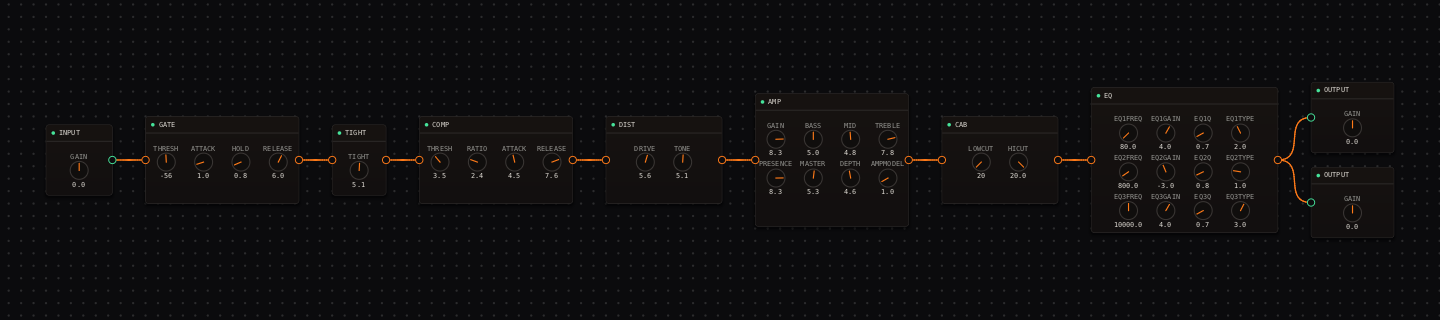
CrossWire field notes. The rig below is real and recallable: a punk tone with the gate engaged at -56 dB, doing real work in front of high-gain distortion.
Almost every effect in CrossWire runs on abstract 0-to-10 knobs. The GATE node is the exception. Its THRESH runs from -90 to -20 dB in real decibels, and dragging it below -90 parks the gate off entirely, with the readout changing to "off". ATTACK, HOLD and RELEASE (defaulting to 1.0 / 0.8 / 6.0) shape how it opens, lingers and lets go. That is the whole node, and the hard part is knowing when to use it at all.
A gate is a high-gain tool
Every rig the Randomizer builds starts with INPUT into GATE into TIGHT, but most published rigs park the gate off. Of the fourteen tutorial rigs, only metal (-44 dB), punk (-56), rock (-52) and shoegaze (-43) engage it. On a clean rig a gate has nothing useful to do except clamp your quiet playing, so the default is off.
Five voicings, matched to the playing
The voicings differ mostly in ATTACK and RELEASE character, which is what you feel. Stop-start rhythm wants high-gain-tight; ringing lead work wants rocktron-hush. Values are THRESH · ATTACK · HOLD · RELEASE.
| Voicing | Values | What it is |
|---|---|---|
| isp-decimator | -48 dB · 0.0 · 0.3 · 4.0 | Transparent, near-instant tracking. The safe modern default. |
| drawmer-ds201 | -50 dB · 1.5 · 2.0 · 5.0 | Classic studio outboard behavior, versatile everywhere. |
| rocktron-hush | -60 dB · 3.0 · 3.0 · 7.0 | Smooth, forgiving release for sustained playing. |
| high-gain-tight | -40 dB · 0.0 · 0.3 · 2.5 | Snap-shut palm-mute cutoff. The metal rhythm setting. |
| vocal-smooth | -55 dB · 4.0 · 5.0 · 8.0 | Gentle, click-free cleanup for quiet sources. |
Mute the strings, drag THRESH up until idle noise dies, then down one step. Hold a chord to silence and watch the tail. If it clips, raise RELEASE before lowering THRESH again. The metal rig walks this exact sequence.
Noise gate on guitar: quick answers
- Do I need a noise gate on a clean guitar tone?
- Usually not. A gate is a high-gain tool. On clean and edge-of-breakup rigs it only eats dynamics, so most of the published tutorial rigs park it off. Of the fourteen, only metal, punk, rock and shoegaze engage it.
- How do I set the gate threshold?
- Mute the strings so your hands are off them, drag THRESH up until the idle noise dies, then back down one step. Then hold a chord to silence and check the tail: if it clips, raise RELEASE before lowering THRESH further.
- How do I turn the gate off?
- Drag THRESH below -90 dB. The readout literally changes to "off", and an idle gate colors nothing. That is how every clean rig in the tutorials ships.
Hear it in a real rig
Open the Randomizer, paste a seed, click Recall.
- Punk tutorial: the -56 dB gate in the screenshot.
- Metal tutorial: a -44 dB gate set before anything else.
- Rig Market: community rigs that use GATE.
Get the CrossWire demo → Standalone app and CLAP plugin, full fidelity, every seed recalls exactly.