How to use delay with guitar
Delay is a rhythm instrument that most players treat as ambience. Get the timing and the number of repeats right and it disappears into the groove; get them wrong and it fights the part. Here’s how we set it across the rigs that use it.
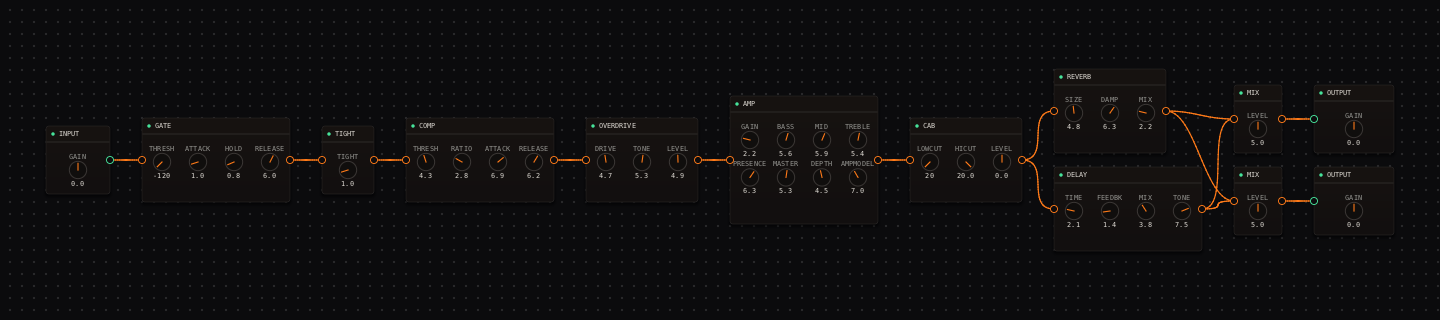
CrossWire field notes. The two rigs pictured below are real and recallable (a slapback and a runaway-feedback wall), so you can hear each idea rather than take our word for it.
The first thing to understand about delay is that it is a rhythmic effect wearing an ambient costume. Reverb asks "how big is the room"; delay asks "how many repeats, and how fast." Answer those two questions in time with the song and delay is invisible in the best way. Answer them wrong and every repeat lands off the beat, cluttering the space between your notes.
Start by counting the repeats
Before touching a single knob, play one staccato note and listen: how many echoes actually matter before your next phrase? That count tells you what kind of delay you are building, and it maps directly onto the FEEDBK knob.
TONE is the knob nobody mentions
The DELAY node has four controls (TIME, FEEDBK, MIX and TONE) defaulting to 4.0 / 3.5 / 3.5 / 7.5. Everyone reaches for the first three. TONE is the one that decides whether your delay sounds like a pristine digital rack or a warm tape unit, because it filters the repeats: high values keep every echo glassy and bright, low values darken each successive repeat the way tape naturally does.
It is also your best mix-fit tool. When repeats clutter the dry part, drag TONE down before you touch MIX. Dark repeats can sit surprisingly loud without masking anything, while bright repeats fight the pick attack at almost any level. That single habit fixes most "my delay is too much" problems without making the effect quieter.
Six starting points, slapback to tape
These are the exact entries on the DELAY node’s voicing dropdown. Recall one, then adjust from a sensible place instead of from the raw defaults. Values are TIME · FEEDBK · MIX · TONE.
| Voicing | Values | What it is |
|---|---|---|
| slapback | 1.5 · 0.5 · 3.5 · 7.0 | One quick bright double. The country-rock rig above sits just past it. |
| tape-echo | 5.0 · 5.5 · 3.5 · 3.5 | Many repeats, each darker than the last; that low TONE is the tape. |
| echorec | 4.0 · 4.5 · 3.0 · 5.0 | The drum-echo flavour: medium, slightly darkened repeats. |
| digital | 5.0 · 4.0 · 3.0 · 9.5 | Clean bright repeats that decay in level but never in tone. |
| ada-std1 | 3.5 · 3.5 · 3.0 · 6.0 | Analog BBD-style middle ground. |
| filter-delay | 4.5 · 5.0 · 3.5 · 4.0 | Darker filtered trails that stack politely under a part. |
The one routing decision: serial or parallel
Run delay in series into a reverb and the repeats get smeared into the room, occasionally lovely but more often mud. Run it in a parallel lane instead and the repeats stay distinct while the dry core is never touched. The slapback shot above is the serial-free version; here is the same idea taken to its extreme:
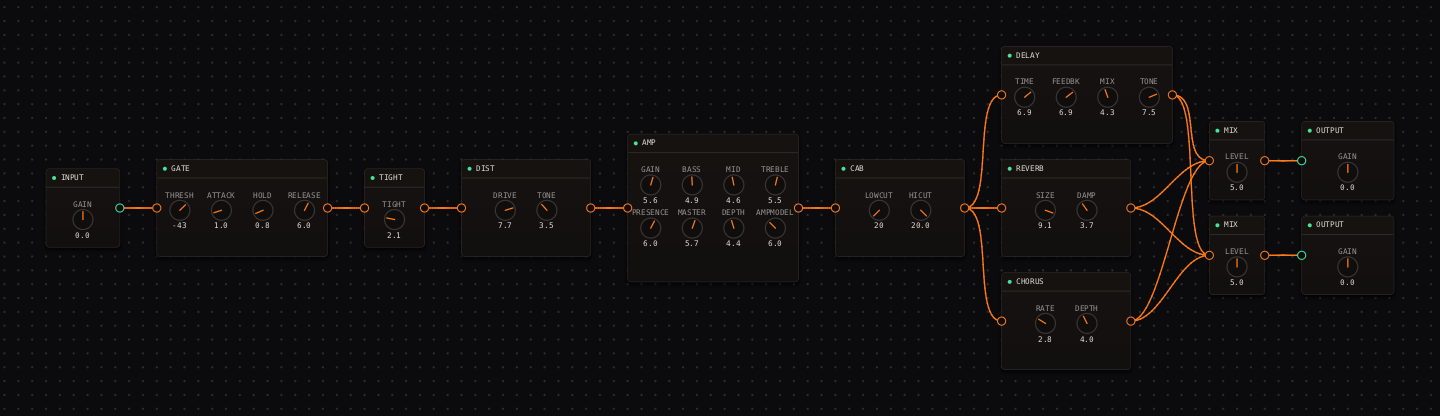
To build a parallel lane in CrossWire: wire the source (the CAB or EQ) into both the DELAY and the next stage, then both onward. The engine drops in a MIX node automatically when two wires meet at one input, and that MIX node’s LEVEL knob becomes your delay-lane fader.
Setting the time by ear
There is no tap-tempo button, and that is on purpose: tapping a tempo you are guessing is less accurate than listening against the actual track. Loop a two-bar phrase, Shift-drag TIME for fine control, and move it until a repeat lands exactly where you want it: on the quarter for a rhythmic pulse, or the dotted-eighth for that shimmering off-grid ambience. For a transition, drag FEEDBK up past 6.5 and the tail keeps ringing; drag it back and the delay decays out on its own instead of cutting off, because the node keeps regenerating whatever the knob does next.
Three ways delay goes wrong
Bright repeats under a busy part. They mask the dry notes. Pull TONE down before anything else. Too much feedback in a dense mix. Texture-level regeneration is a bed for sparse playing, and it turns strummed parts to soup. Delay into reverb by default. Series stacking smears both; reach for a parallel lane unless you specifically want the smear.
Delay on guitar: quick answers
- How do you set delay time to the tempo without tap tempo?
- By ear, at song speed. Loop a two-bar phrase and drag the TIME knob (hold Shift for fine steps) until a repeat lands exactly on the beat you want, usually the quarter or the dotted-eighth. There is no tap button because your ear against the actual track is more accurate than tapping a tempo you are guessing at anyway.
- Should delay go before or after distortion?
- After, almost always, so the repeats are clean echoes of a finished tone rather than getting re-distorted into a smear. In CrossWire that means DELAY sits after the AMP and CAB. Running delay into the front of the amp is a specific lo-fi trick, and rarely what you want by default.
- What is the difference between slapback and echo?
- Slapback is a single fast repeat (one bright doubling, feedback almost off) that adds width and vintage snap without a rhythmic figure. Think rockabilly and country. Echo keeps repeating: three to five audible repeats make a rhythmic delay, and past that the effect starts regenerating into a wash.
- How much feedback is too much?
- Feedback sets how many repeats you get. Below about 1.5 it is a slapback; three to five repeats is a rhythmic delay; above roughly 6.5 the delay self-regenerates and becomes a texture that rings for bars. None of those is wrong. The mistake is using texture-level feedback under a busy part, where the repeats pile into mud.
Hear these in a real rig
Open the Randomizer, paste a seed, click Recall, and the canvas rebuilds with every value set.
- Country-rock: the slapback in a parallel lane (the first screenshot).
- Rock: a quarter-note lead delay beside a short room.
- Shoegaze: FEEDBK 6.9 as a wall-building texture (the second screenshot).
- Rig Market: community rigs that use DELAY.
Get the CrossWire demo → Standalone app and CLAP plugin, full fidelity, every seed recalls exactly.